EN-11
Radio Mode
Select Radio as Playing Source
Open the Source Menu and then touch
[Radio].
Select One Radio Band
Press the [BAND] button on remote control
or touch the [ ] icon on the user interface
to select one radio band among FM1, FM2,
FM3, AM1 and AM2.
Tune
Auto Tuning
Press the [ ] / [ ] button on the remote
control briey or hold [ ] / [ ] icon on the
user interface more than 1 second to seek a
higher / lower station.
To stop searching, repeat the operation
above or press other keys having radio
functions.
Note:
When a station is received, searching stops
and the station is played.
Manual Tuning
Method 1:
During manual tuning, the frequency will be
changed in steps.
Press the [ ] / [ ] button on remote
control or touch the [ ] / [ ] icon on the
user interface to tune in a higher / lower
station.
Method 2:
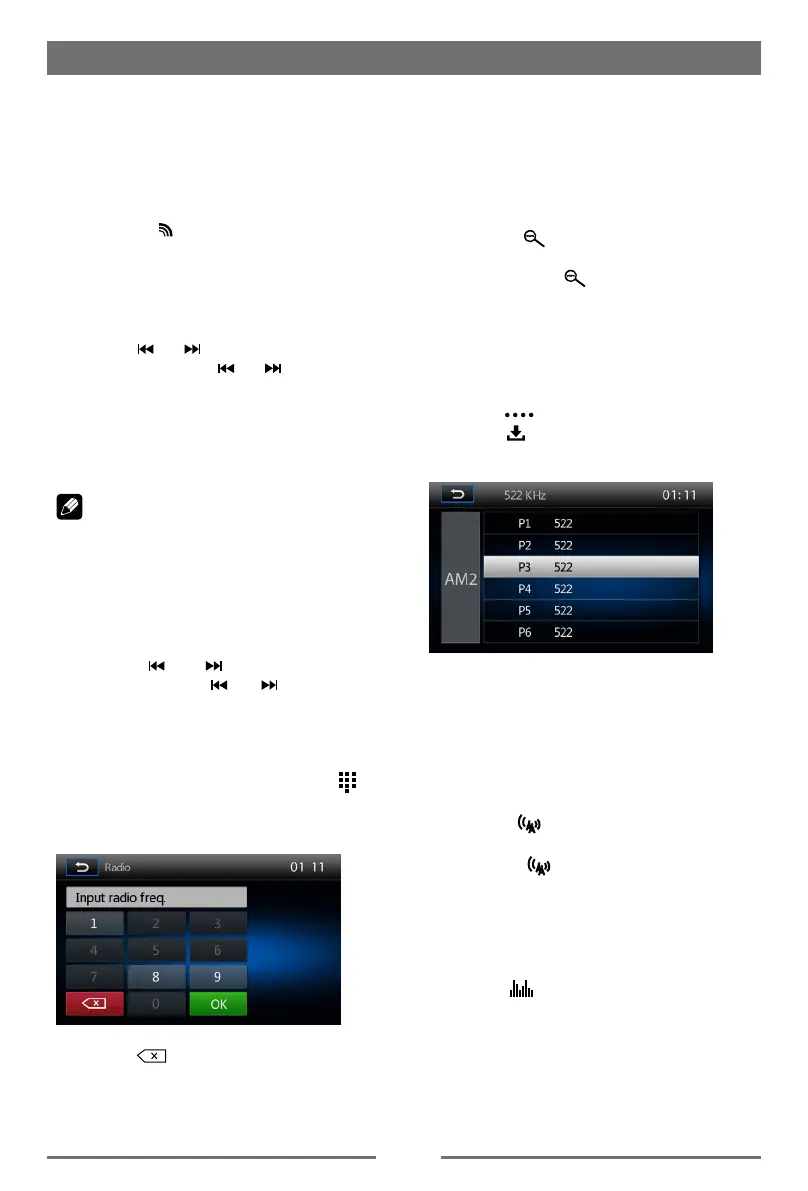
1. Touch the numeric keypad icon [
].
Numeric keyboard is displayed, touch
number to input frequency.
2. Touch [ ] to delete the input number
step by step.
3. Touch [ OK ] to enter.
Preset Station
The unit has 5 bands, such as FM1, FM2,
FM3, AM1, AM2, and each band can store 6
stations; hence the unit can store 30 stations
in total.
Intro/Scan
Press the [
] icon to intro. Each stored
station will play for 5 seconds automatically.
Hold down the [
] icon to scan. Only
stations with sufficient signal strength will
be detected and stored in the memory. After
scaning, P1 will play automatically.
Manual Store
1. Tune to a station.
2. Touch [
] to display the 2nd menu.
3. Touch [ ].
4. Touch one of the channels P1 to P6 to
save the select band.
Tune to a Preset Station
1. Touch [Radio].
2. Select a band (if needed).
3. Touch one of the preset channels (P1 to
P6) on the screen.
Local Seeking
Touch the [ ] icon and choose the Radio
Local or Distance.
When the [
] icon turns bright, only
stations with sufcient signal strength will be
detected.
EQ Selection
Press the [ ] icon and enter the EQ setup.


 To Next Page