EN-4
Before using
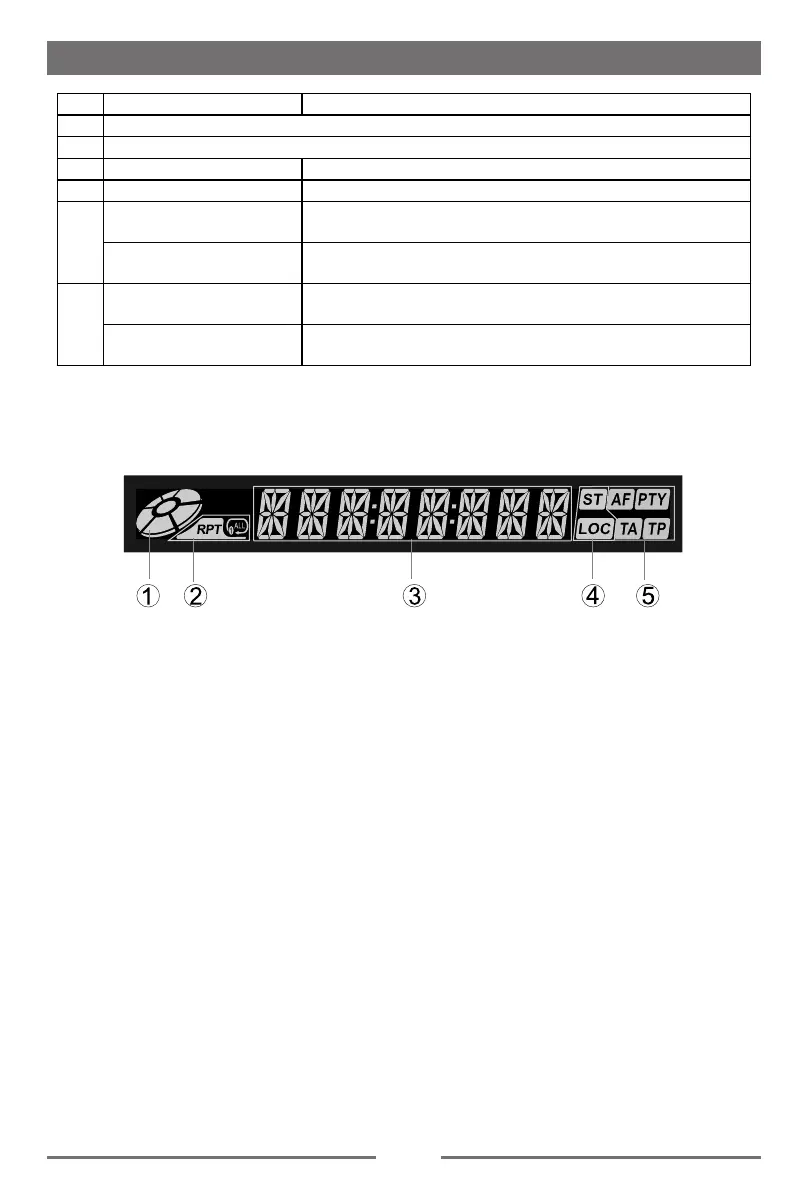
LCD Display
1. Disc indicator
Light up when one disc is inside;
lightning when disc is playing.
2. Repeat mode indicator
Light up when repeat mode is on; Light off when repeat mode is off.
3. Main display area
Display characters, playback time, tuning frequency, clock and other text information.
4. Radio status indicators
Stereo indicator lights up when the radio broadcast is a stereo one;
Local indicator lights up when the local seeking function is activated.
5. RDS function indicators
AF: Alternative Frequency
PTY: Program TYpe
TA: Traffic Announcement
TP: Traffic Program
Note:
①
Most information can be displayed on this LCD only when the TFT monitor is closed.
②
Only English font support on this LCD.
Key Operation Description
8 AV IN2 jack
9
USB Slot
10 Press Eject
11 Press TFT Display Close/Open
12
Press
TFT Display Open: TILT+(Step) ;
TFT Display Close: Previw.
Press and hold
TFT Display Open: TILT+(Continuation);
TFT Display Close: Scan and Auto Store.
13
Press
TFT Display Open: TILT-(Step);
TFT Display close: FM Source and Band Select.
Press and hold
TFT Display Open: TILT-(Continuation);
TFT Display close: N/A


 To Next Page