EN-10
Basic Operations
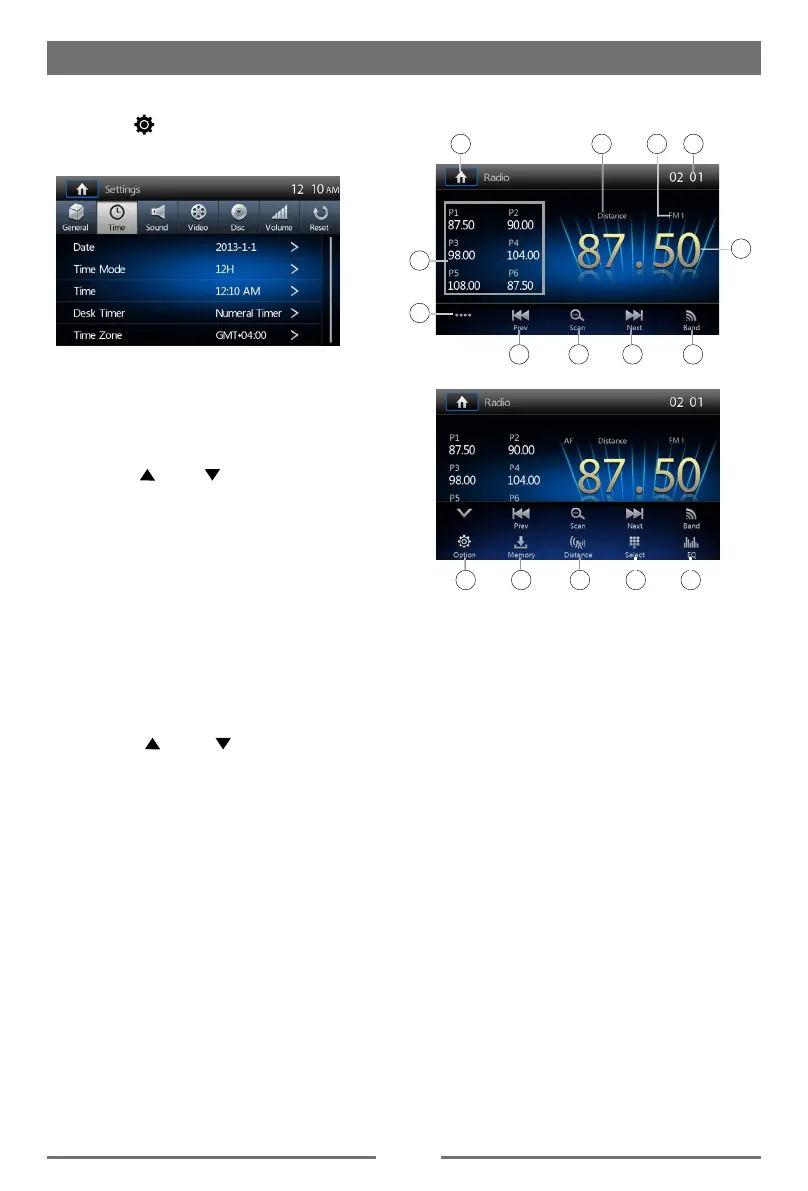
Set Date /Time
1. Touch [ ].
2. Touch [ Time ].
The date/time setup menu is displayed.
· Set Date
1. Touch [ Date ].
2. Touch the date information on the screen
.
A submenu is displayed.
3. Touch [ ] or [ ] to set year, month
and day.
· Set Time Mode
1. Touch [Time Mode].
2. Touch [12H] or [24H] to switch clock
mode.
· Set Time
1. Touch [ Time ].
2. Touch the time on the screen, a submenu
is displayed.
3. Touch [ ] or [ ] to set hour and
minute.
· Set Desk Timer
1. Touch [ Desk Timer ].
2. Touch [ Simulate Timer ] or [ Numeral
Timer ] .
· Set Time Zone
1. Touch [Time Zone].
2. A submenu will be displayed.
3. Touch to select the time zone you desire.
4. The time zone of the device default setting
is “ GMT+01:00 “.
Tuner TFT Display
7
1
5
6
8
2
9
3 4
10
11
14 15 161312
1. Touch to view the SOURCE MENU and
select a new playback source
2. Distant signal broadcasting indicator
3. Current radio band indicator
4. Clock
5. Broadcaster information stored at the preset
6. Touch to view more on-screen buttons
7. Touch to seek backward
8. Scan preset stations
9. Touch to seek forward
10. Touch to change between AM/FM bands
11. Current radio information
12. RDS setting options
13. Save the desired radio station
14. Touch to change between Local and
Distance
15. Enter frequency directly
16. Touch for quick access to Equalizer level
settings
Radio Mode


 To Next Page