EN-21
Repeat play
This function allows you to play the track
repeatedly.
Touch the [
Repeat
] button to select Repeat
one or Repeat all.
Random play
This function allows you to play all tracks in a
random order.
Touch the [
Random
] button to perform random
play.
Setting iPod mode
Use this function if you wish to operate
through your iPod connected to this unit via
the ipod cable.
Touch the [
] button, then touch [Setting]
to show [Shufe] / [Repeat].
[Shufe]:
- Shufe off
- Shufe Songs
- Shufe Albums
[Repeat]:
- Repeat off
- Repeat One
- Repeat All
iPod video playback
To playback video from iPod, touch top left
corner of the screen, then select a video le
to play.
During playback, touch the bottom half of
screen to show operation bar.
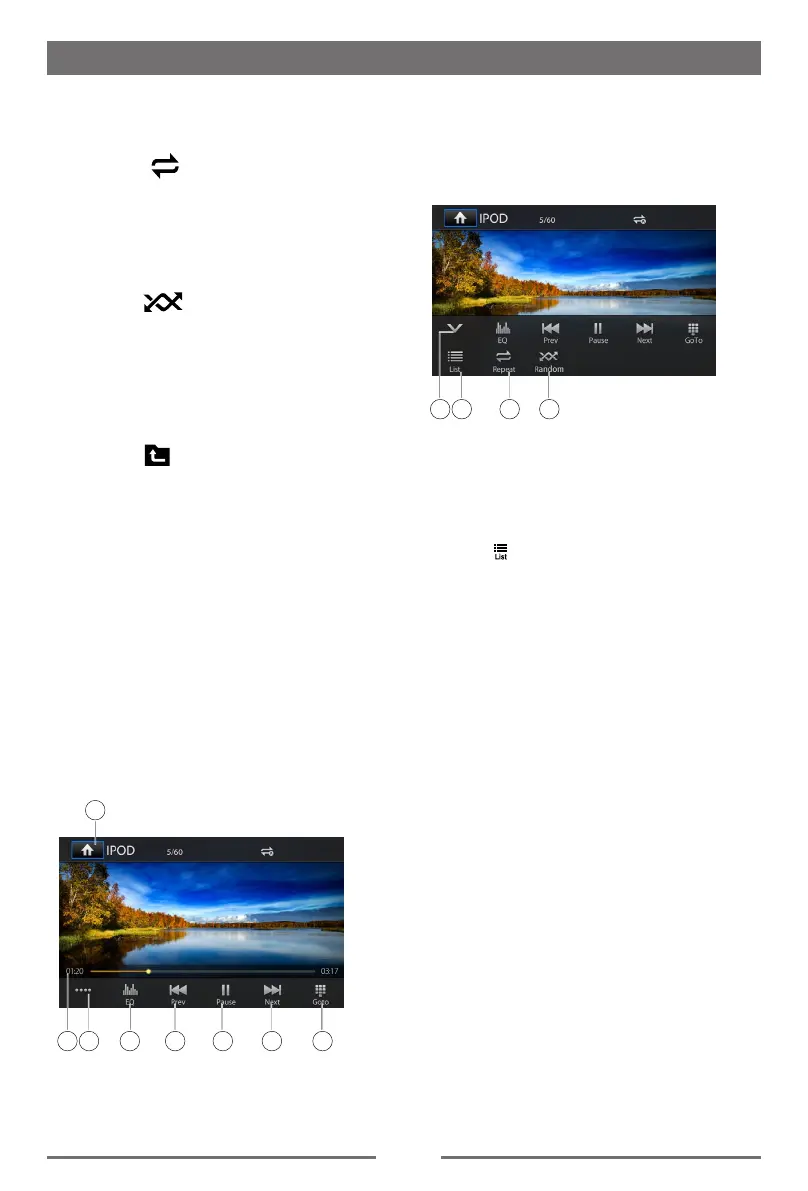
3
1
4 5 6 7 82
1.
Enter the main menu
2. Progress bar
3. Display the 2nd menu
4.
EQ setting
5. Previous le
Fast reverse (long press)
6. Play/Pause
7. Next le
Fast forward (long press)
8. Skip to a chapter/title/time
9
1110 12
9. Hide the 2nd menu
10.Show iPod list menu
11.Repeat play
12.Random play
Return to video list menu
Touch [ ] button on the operation bar to
return to video list menu.
iPod & iPhone Mode


 To Next Page