9
Hardware Description
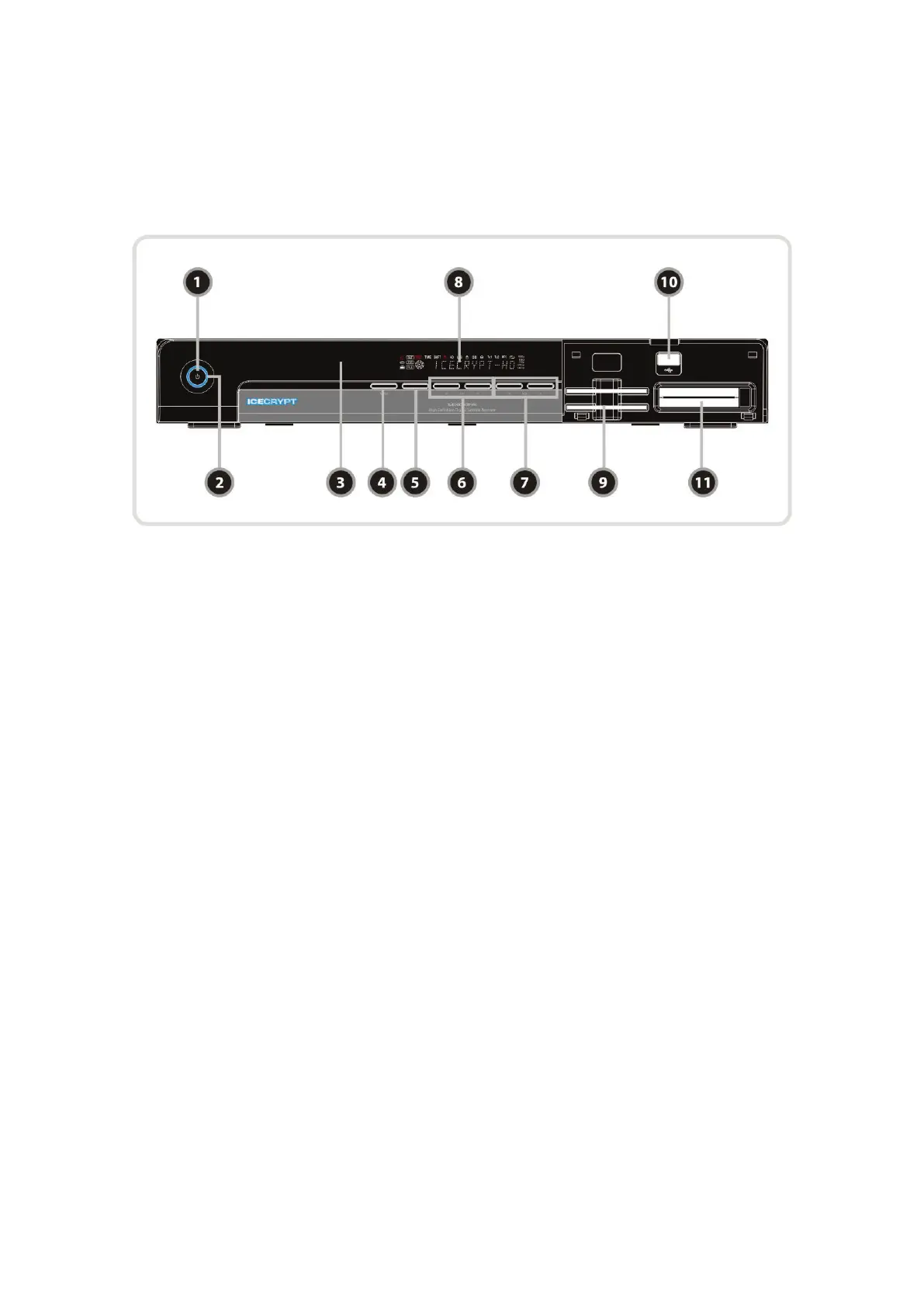
1. Front Panel Configuration
1. POWER BUTTON : Press to switch between STANDBY and POWER ON modes.
2. LED indication : The LED lights up in running mode and standby mode. You can adjust LED Lighting
Time and LED Brightness. (Main Menu >Configuration>Display Setting)
3. Remote Sensor : Receives signal from remote controller.
4. MENU Button : Press to display the main menu or to move to the previous menu.
5. OK Button : Press to display the service list in non-menu mode and to select an item or confirm
in menu mode.
6. CH Up/Down button : Press to change services in normal mode, or to move highlighted-bar in menu
mode.
7. Vol Up/Down button : Press to change audio volume in normal mode or to navigate menu in menu
mode.
8. VFD Display : The VFD consist of 12-digit letter and various icons. These letters and icon display the
current status of receiver such as service name, service information and so on.
9. SMART CARD READER : Insert smart card for encrypted service access.
10. USB(Front) : Use it when connecting to external USB storage device.
11. PCMCIA : To receive pay-tv service you need a CA-Module and a smart card from the service provider.


 To Next Page