USB port interpretation
Install USB driver
This release of the USB driver is contained on the iCharger 106B+ software CD-ROM.
To install the USB driver, run the program X:\USB driver\iChargerUSBInstaller.exe (where X is the drive
letter designator for your CD-ROM drive.)
Charger firmware upgrade steps
Install the iCharger USB driver
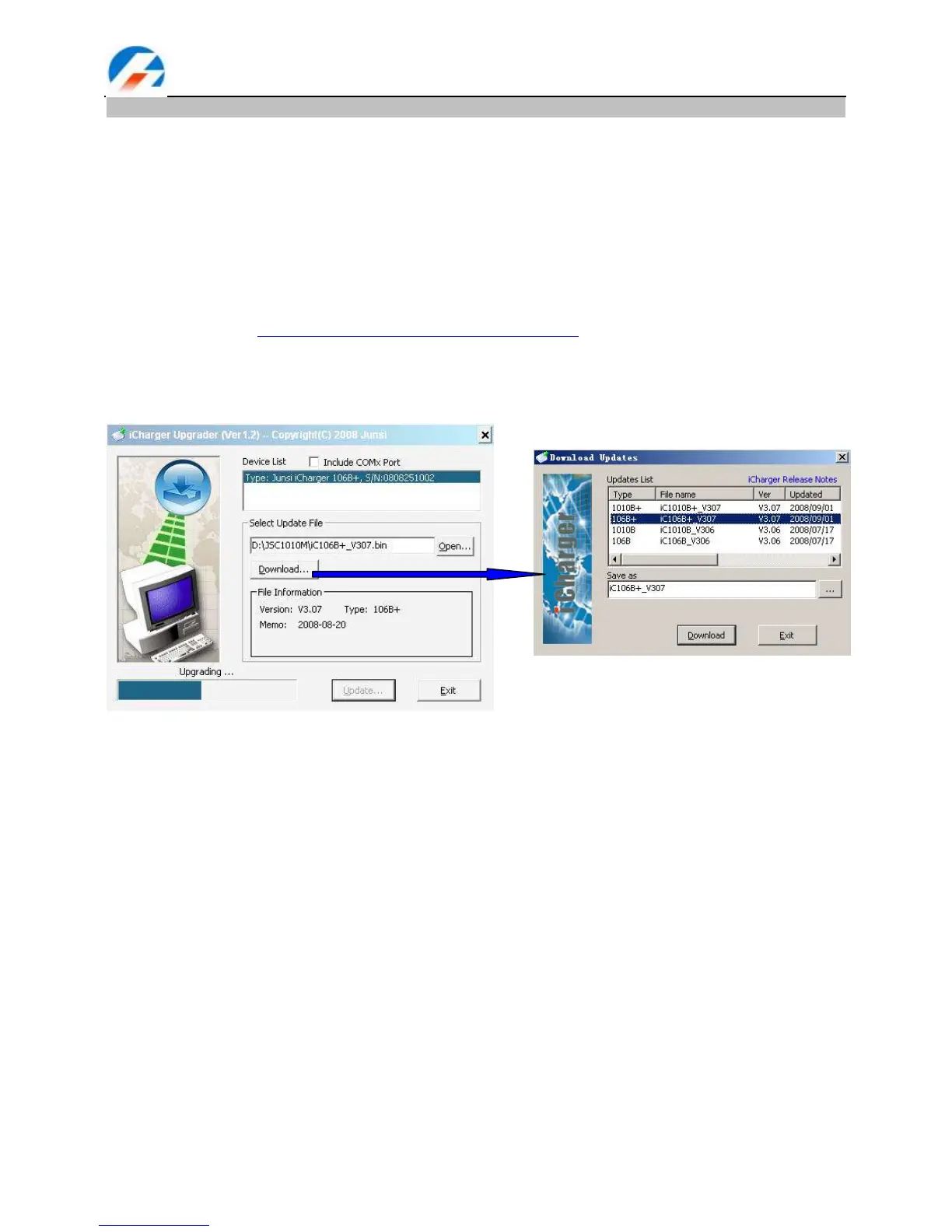
Run the program X:\Upgrader\Upgrader.exe (you can download the Upgrader.exe software from the
following website: http://www.jun-si.com/UploadFiles/Upgrader.rar ).
Connect the iCharger to the PC using the supplied USB cable, choose ―Device‖ in ―Device List‖, then
select the upgrade file (you can download the latest file). The progress bar will appear after you click
―Update…‖
Note: You must only ever use the supplied USB cable provided with your iCharger as this is a custom cable
with internal differences from other USB cables.



 To Next Page