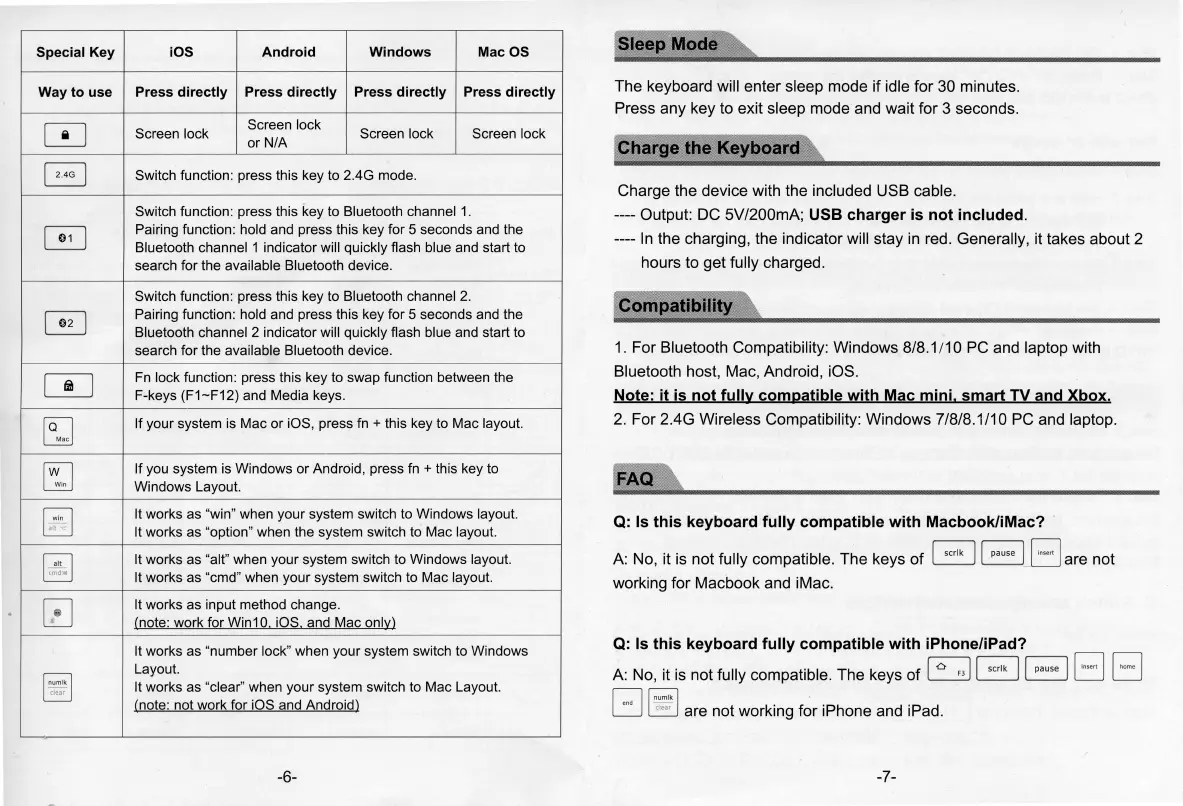
Special Key iOS Android
Windows Mac OS
Way to use Press directly Press directly
Press directly
Press directly
[!]
Screen lock
Screen lock
Screen lock Screen lock
or N/A
B
Switch function: press this key
to
2.4G mode.
Switch function: press this key to Bluetooth channel
1.
G
Pairing function: hold and press this key for 5 seconds and the
Bluetooth channel 1 indicator will quickly flash blue and start to
search for the available Bluetooth device.
Switch function: press this key to Bluetooth channel
2.
~
Pairing function: hold and press this key for 5 seconds and the
Bluetooth channel 2 indicator will quickly flash blue and start
to
search for the available Bluetooth device.
[:!]
Fn
lock function: press this key to swap function between the
F-keys (F1-F12) and Media keys.
~
If your system
is
Mac or iOS, press fn + this key to Mac layout.
[SJ
If you system
is
Windows or Android, press
fn
+ this key to
Windows Layout.
§]
It works as "win" when your system switch
to
Windows layout.
It
works as "option" when the system switch to Mac layout.
~
It
works as "alt" when your system switch to Windows layout.
.
It works as "cmd" when your system switch to Mac layout.
0
It
works as input method change.
(note: work for Win10 iOS and Mac onl~)
It works
as
"number lock" when your system switch to Windows
~
Layout.
It
works
as
"clear" when your system switch
to
Mac Layout.
.
(note: not work for iOS and Android)
-6-
I
S!eep
1
Mode
!':s
The keyboard will enter sleep mode if idle for 30 minutes.
Press any key to exit sleep mode and wait for 3 seconds.
Char9e1:he
Keyboard
Charge the device with the included USB cable.
---- Output: DC 5V/200mA; USB charger
is
not included.
----
In
the charging, the indicator will slay
in
red. Generally, it takes about 2
hours to get fully charged.
1. For Bluetooth Compatibility: Windows 8/8.1 /1 O PC and laptop with
Bluetooth host, Mac, Android, iOS.
Note: it
is
not fully compatible with Mac mini. smart TV and Xbox.
2.
For 2.4G Wireless Compatibility: Windows 7/8/8.1/10 PC and laptop.
Q:
Is
this keyboard fully compatible with Macbook/iMac?
A:
No, it is not fully compatible. The keys
of
B
BB
are not
working for Macbook and iMac.
Q:
Is
this keyboard fully compatible with iPhone/iPad?
~ ~
r,::~i
O 0
A:
No, it is not fully compatible. The keys of
~
L.'.:'.:_J
L:J
D D
0
r;;:;;;i
.
L.:J
~
are not working for iPhone and iPad.
-7-


 To Next Page
 Loading...