•
FRONT
BLOCK
©
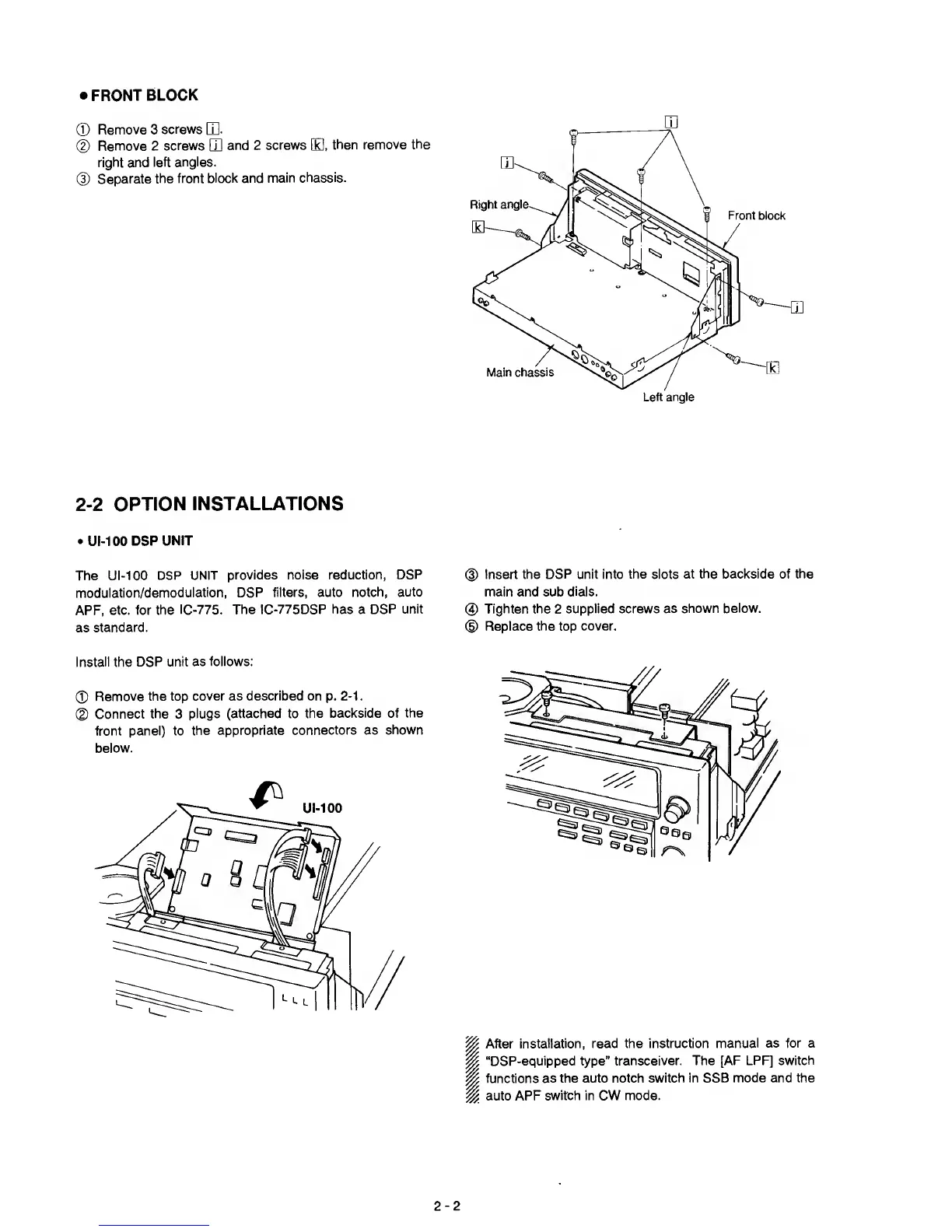
Remove 3
screws
Q].
®
Remove 2
screws
Q]
and 2
screws
B,
then remove
the
right and
left
angles.
@
Separate
the
front block
and
main chassis.
2-2
OPTION
INSTALLATIONS
•
UI-100
DSP
UNIT
The UI-100
DSP UNIT
provides noise reduction, DSP
modulation/demodulation, DSP
filters, auto notch,
auto
APF, etc. for
the IC-775.
The IC-775DSP
has
a
DSP unit
as
standard.
Install
the
DSP unit
as follows:
©
Remove the top
cover as described on
p.
2-1
.
©
Connect the
3
plugs
(attached
to
the
backside of the
front panel) to
the
appropriate connectors as
shown
below.
m
(D
Insert the DSP unit into
the slots at
the backside of the
main
and
sub
dials.
0
Tighten
the
2
supplied screws as
shown below.
(D
Replace the top
cover.
I
After
installation, read the instruction
manual as for a
“DSP-equipped type”
transceiver. The [AF LPF]
switch
functions
as the auto notch
switch in SSB mode and the
auto APF
switch in CW mode.
2-2



 To Next Page