•
AC
VOLTAGE
SELECTION
i
A
WARNING:
DISCONNECT the AC
power
P
cable
from the
transceiver
and wait
a few
minutes
^
before
seiecting an
AC power voltage.
The
regulator unit in the
IC-775/DSP
can be switched to
1
20
or 230 V AC.
®
Remove the REG
unit as
described
on
p.
2-1
.
(2)
Remove the 16
screws to
remove the internal shield
cover of the
regulator unit.
(D
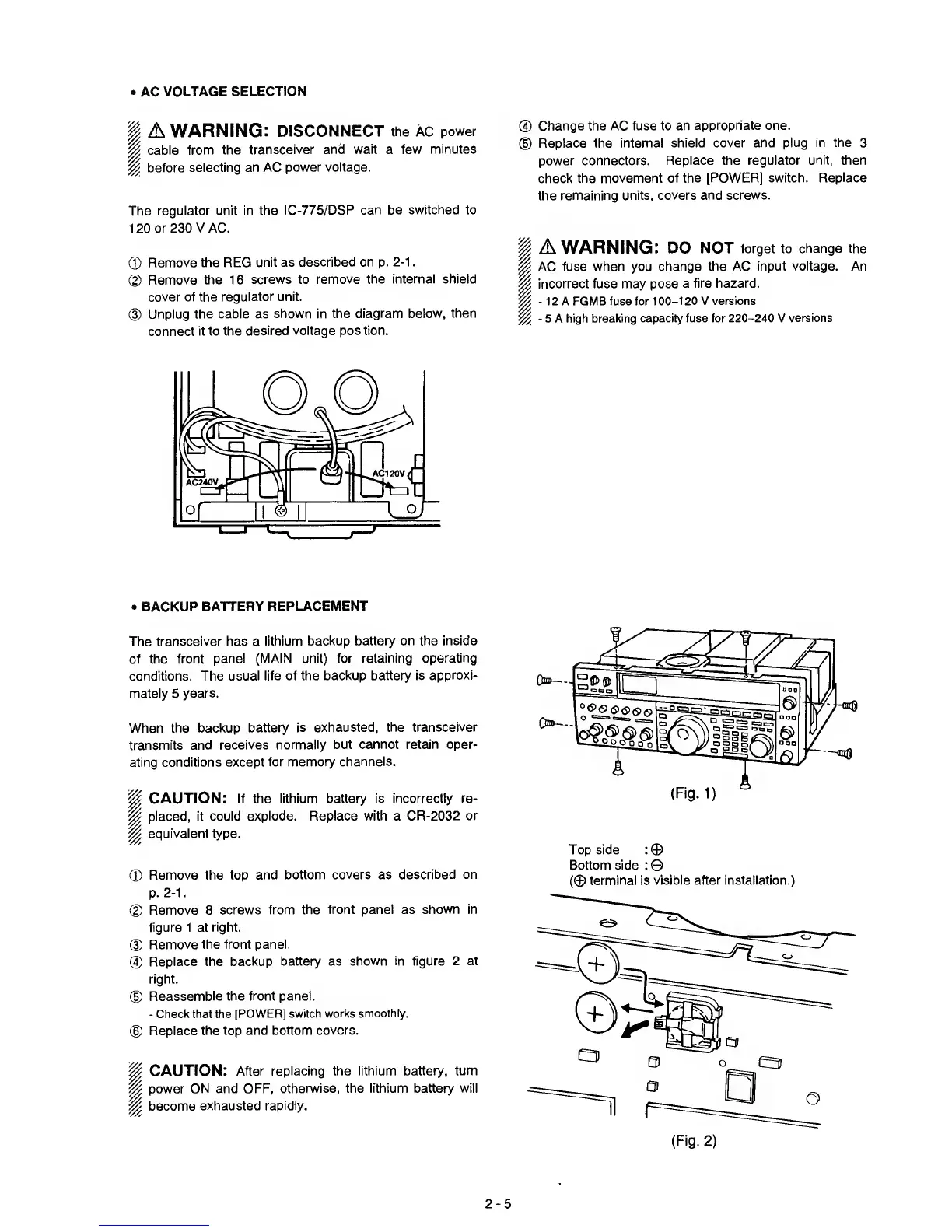
Unplug
the cable as
shown in the
diagram below, then
connect
it to the
desired voltage position.
@
Change the AC fuse to an
appropriate one.
©
Replace the
internal shield cover and
plug in the
3
power connectors.
Replace the regulator
unit,
then
check
the movement of
the [POWER] switch.
Replace
the
remaining units,
covers and screws.
A
WARNING:
DO NOT forget to
change the
AC
fuse
when
you change
the
AC
input voltage. An
incorrect fuse may pose
a fire hazard.
-
12 A FGMB fuse for
100-120
V versions
-
5 A high breaking
capacity fuse for
220-240
V
versions
•
BACKUP
BATTERY REPLACEMENT
The
transceiver
has a
lithium
backup battery on the inside
of the front
panel
(MAIN unit) for retaining
operating
conditions.
The
usual life of the backup battery is
approxi-
mately
5
years.
When
the backup
battery is
exhausted, the
transceiver
transmits
and receives
normally but cannot retain
oper-
ating
conditions except
for memory
channels.
P
CAUTION:
If the
lithium battery is
incorrectly re-
P
placed,
it
could
explode. Replace
with
a CR-2032
or
p
equivalent type.
®
Remove the top
and bottom
covers as described on
p.
2-1.
®
Remove 8
screws from the
front panel as shown in
figure 1 at
right.
@
Remove the front panel.
®
Replace the backup
battery as
shown in figure 2 at
right.
®
Reassemble the front panel.
-
Check that the
[POWER] switch
works smoothly.
®
Replace
the top and bottom
covers.
P
CAUTION: After
replacing the
lithium
battery,
turn
P
power
ON and OFF,
otherwise, the lithium battery
will
p
become
exhausted
rapidly.
Topside
:©
Bottom side
:
©
(©
terminal is
visible after installation.)
(Fig.
2)
2-5



 To Next Page