EasyManua.ls Logo

Icom IC-M45A - Set Mode Options: Beep Tones and Scan

Icom IC-M45A
24 pages
Print Icon
To Next Page IconTo Next Page
To Previous Page IconTo Previous Page
Loading...
D SCAN TIMER
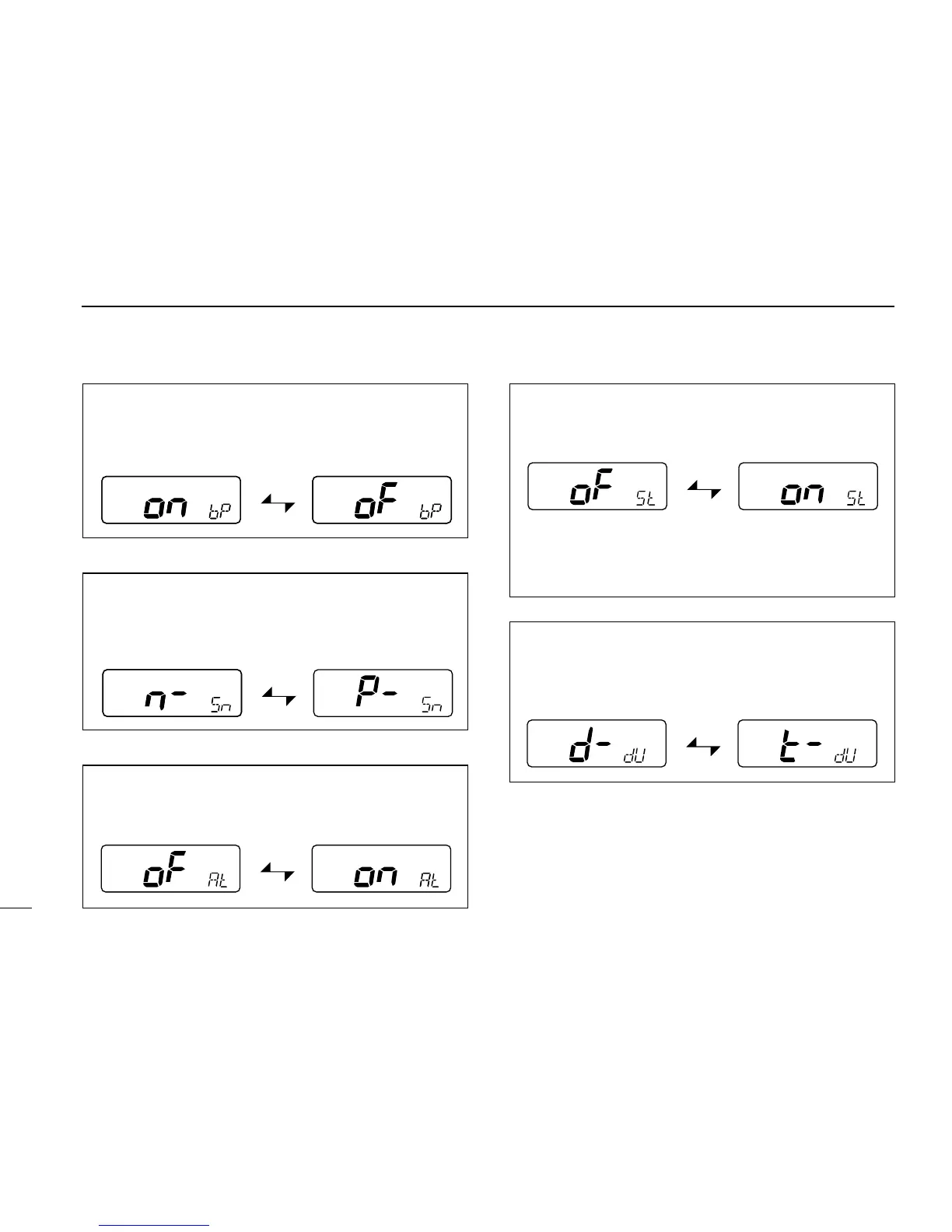
This item sets the scan timer ON or OFF.
D WEATHER ALERT
This item sets the weather alert function ON or OFF. (p. 6)
12
4
SET MODE
Beep tones ON (default)
Beep tones OFF
Normal scan (default)
Priority scan
Weather alert OFF (default)
Weather alert ON
Scan timer OFF (default) Scan timer ON
• Scan pauses on a
signal and resumes 5
sec. later.
• Scan pauses on a signal
until the signal
disappears, and resumes
3 sec. after that.
Dual watch (default) Tri-watch
D BEEP TONES
This item sets the transceiver’s confirmation beep tones
(when pushing a switch) ON or OFF.
D NORMAL/PRIORITY SCAN
This item sets the scan function to normal or priority oper-
ation. (See p. 9)
D DUAL/TRI-WATCH
This item sets the [CH/WX
• DUAL] switch to activate dual
watch or tri-watch. (p. 7)