18
1
7
4
10
15
18
2
8
13
5
11
16
3
9
14
6
12
17
DIGITAL SELECTIVE CALLING (DSC)
7
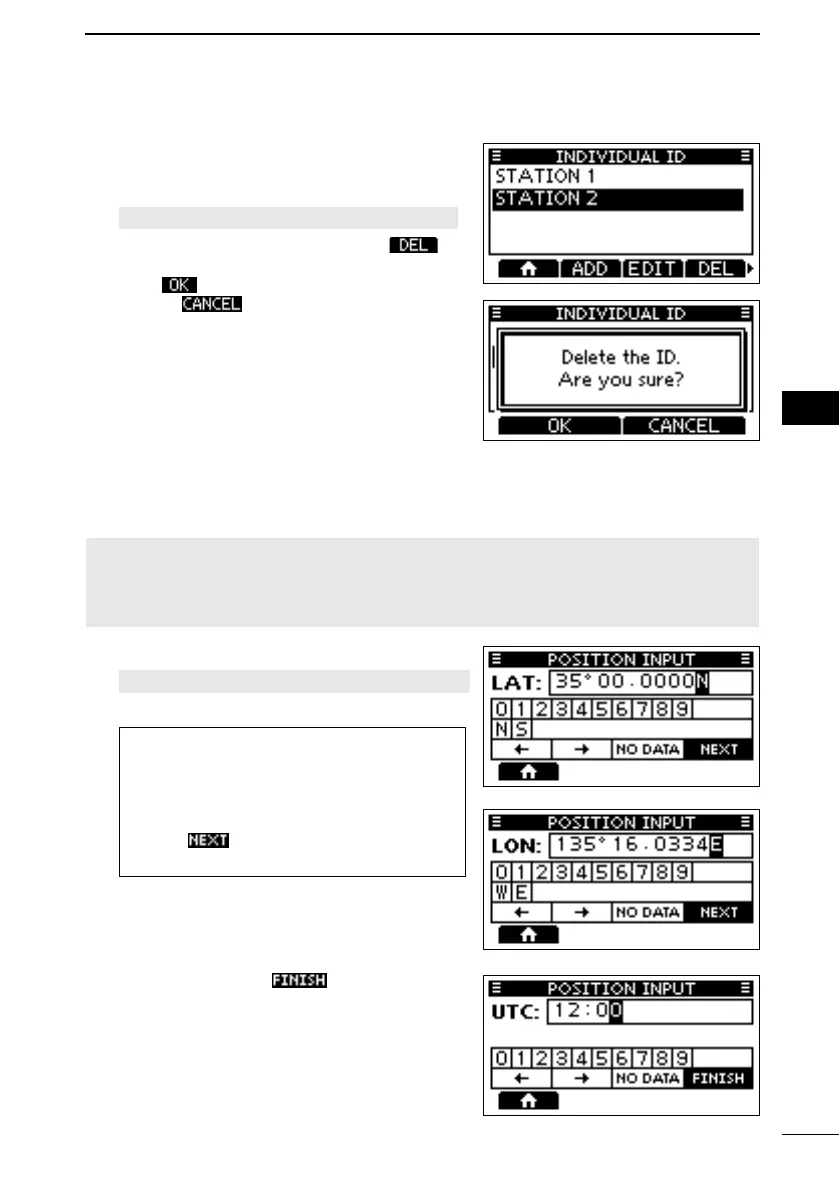
D Deleting an entered ID
1. Open the “INDIVIDUAL ID” screen.
[MENU] > Settings > DSC > Individual ID
2. Select “STATION 2,” and then push
.
• “Delete the ID. Are You Sure?” is displayed.
3. Push
to delete.
L Push to cancel the deletion.
• The selected ID is deleted, and then returns
to the previous screen.
■ Entering the position and time
A Distress call should include the vessel’s position, date, and time. If no GPS data is
received, manually enter the position and Universal Time Coordinated (UTC) time.
NOTE:
•
• The manually entered position and time is valid only for 23.5 hours, or until turning
OFF the transceiver.
1. Open the “POSITION INPUT” screen.
[MENU] > Settings > DSC > Position Input
2. Enter the latitude.
TIP:
• Select a number or a compass direction
•
[DIAL] to move the cursor.
• Select
and then push [ENT] or
[DIAL] to save the selected number.
3. Enter the longitude and the UTC time.
L See the TIP in step 2 to enter.
4. After entering, push to save, and
return to the
“DSC” screen.
FELLECS-TECH | inbox@fellecs-tech.com | www.fellecs-tech.com



 To Next Page