17
7
DIGITAL SELECTIVE CALLING (DSC)
■ DSC address ID
D Entering an Individual or Group ID
You can enter a total of 75 Individual IDs and 25 Group IDs, and assign names to them of
up to 10 characters.
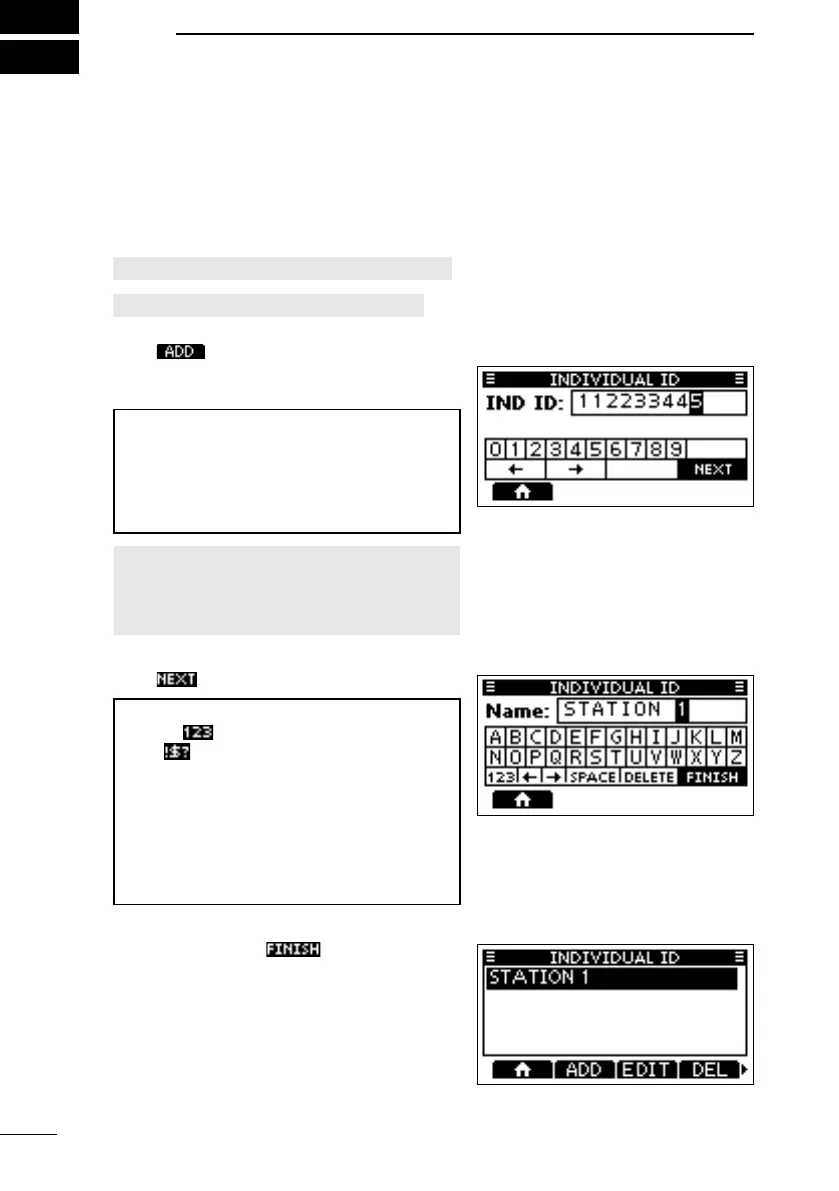
1. Open the “INDIVIDUAL ID” or “GROUPID” screen.
[MENU] > Settings > DSC > Individual ID
[MENU] > Settings > DSC > Group ID
• “No ID” is displayed if no ID is entered.
2. Push .
• The ID entry screen is displayed.
3. Enter an Individual or Group ID.
TIP:
•
• Push [ENT] or [DIAL] to set the selected
number.
•
[DIAL] to move the cursor.
NOTE:
•
•
4. Push to start entering the ID’s name.
TIP:
• Select
to enter numbers and letters,
and
to enter symbols.
• Select a number, character, or space using
• Push [ENT] or [DIAL] to enter the selected
number or character.
•
move the cursor, or to select the entered
character.
5. After entering, push
to save, and
return to the previous screen.
• The entered name is displayed.
FELLECS-TECH | inbox@fellecs-tech.com | www.fellecs-tech.com



 To Next Page