25
7
DIGITAL SELECTIVE CALLING (DSC)
D Sending an All Ships call
All Ships that have DSC transceiver use Channel 70 as their listening channel. When you
call.
1. Push
.
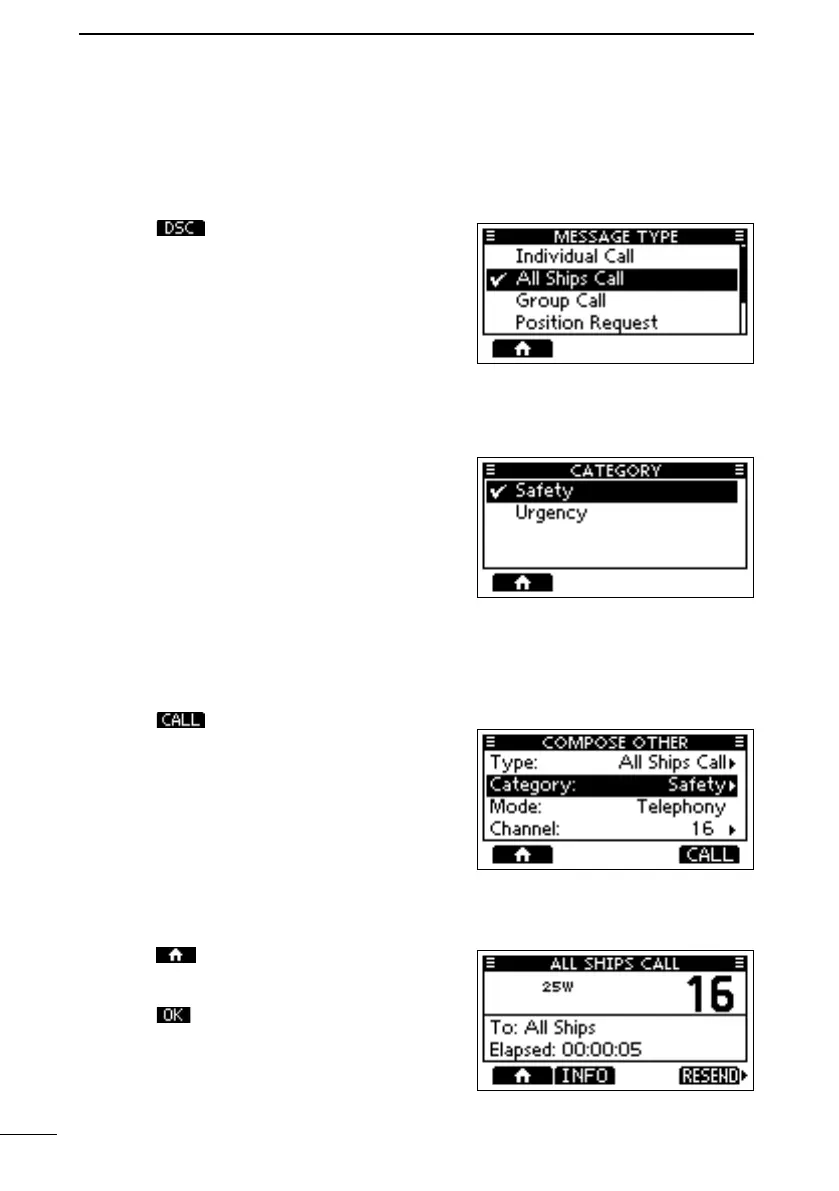
• The “COMPOSE OTHER” screen is displayed.
L You can also display the screen by selecting
the “Compose Other” item on the Menu
screen.
2. Select “Type,” and then push [ENT] or [DIAL].
• The “MESSAGE TYPE” screen is displayed.
3. Select “All Ships Call,” and then push [ENT] or
[DIAL].
• Returns to the previous screen.
4. Select “Category,” and then push [ENT] or [DIAL].
• The “CATEGORY” screen is displayed.
5. Select a category of the call, and the push
[ENT] or [DIAL].
• Returns to the previous screen.
6. Select “Channel,” and then push [ENT] or [DIAL].
7. Select the channel to assign, and then push [ENT] or [DIAL].
L The assigned channels are preset by default.
8. Push to send the All Ships call.
• “Transmitting All Ships Call” is displayed, and
then the assigned channel is automatically
selected.
L If Channel 70 is busy, the transceiver stands
by until the channel becomes clear.
9.
10. Push
to finish the All Ships call.
• “Terminate the procedure. Are you sure?” is
displayed.
11. Push
to return to the operating screen.
• Returns to the operating screen.
FELLECS-TECH | inbox@fellecs-tech.com | www.fellecs-tech.com



 To Next Page