EasyManua.ls Logo

Icom iM400BB - User Manual

Icom iM400BB
24 pages
Print Icon
To Next Page IconTo Next Page
Loading...
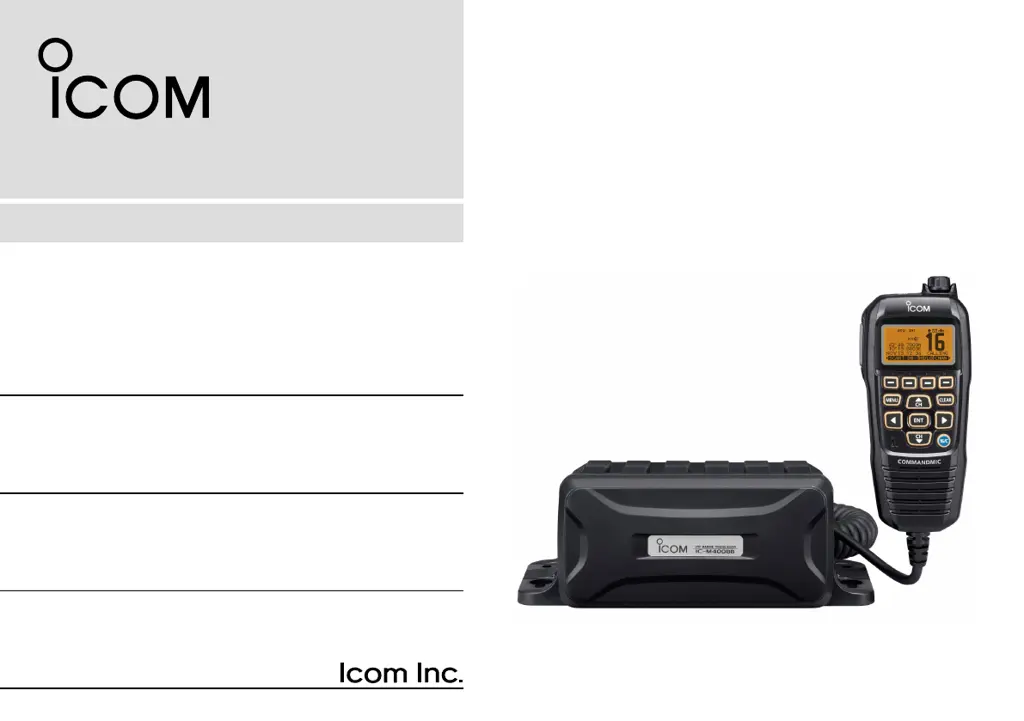
INSTRUCTION MANUAL
This device complies with Part 15 of the FCC Rules. Opera-
tion is subject to the condition that this device does not cause
harmful interference.
COMMANDMIC
IV
™ (HM-195)
may not be supplied, depending
on the transceiver version.
iM400BBE
VHF MARINE TRANSCEIVERS
iM400BB

Questions and Answers

  • D
    donna61Aug 7, 2025
    Why is there little or no sound from my Icom iM400BB speaker?
    • S
      Stephanie WilliamsAug 7, 2025
      If you're experiencing low or no sound from the speaker, there could be a few reasons. First, the squelch level might be set too high; try setting it to the threshold point. Alternatively, the volume level could be too low; adjust it to a suitable level. Finally, if the speaker has been exposed to water, use the AquaQuake function to remove it.
  • D
    Daniel GarzaAug 11, 2025
    What to do if my Icom Transceiver does not turn ON?
    • W
      Wendy GibsonAug 11, 2025
      If your transceiver isn't turning on, the issue might be a bad connection to the power supply. Check the connection to both the transceiver and the power supply to ensure they are properly connected.
  • A
    Alex WilcoxAug 16, 2025
    Why can't I transmit or select high power on my Icom iM400BB?
    • K
      kathleenedwardsAug 16, 2025
      If you're unable to transmit or select high power, it could be due to a couple of reasons. Some channels may be programmed for low power or receive-only operation according to regulations, so try changing channels. Also, the output power might be set to low; push the [HI/LO] button to select high power.
  • M
    Mrs. Tammy SantiagoAug 19, 2025
    What to do if my Icom iM400BB scan does not start?
    • B
      Brittany RiversAug 20, 2025
      If the scan function isn't starting, it may be because you haven't programmed any favorite channels. Set the channels you want to scan as Favorite channels.
  • E
    Emma FletcherAug 25, 2025
    How to fix “NO POSITION” and “NO TIME” displayed on my Icom iM400BB?
    • D
      Donald FordAug 25, 2025
      If your IC-M400BBE displays “NO POSITION” and “NO TIME,” it indicates an issue with GPS reception or manual entry. First, ensure the GPS antenna has a clear view to receive signals from satellites. If that doesn't work, manually enter the position and time.
  • C
    christopher85Aug 29, 2025
    Why are there no beep sounds on my Icom iM400BB Transceiver?
    • L
      Lee MitchellAug 29, 2025
      If you're not hearing any beep sounds, the beep tones may be turned OFF. Go to the CONFIGURATION menu and turn the beep tones ON.
  • W
    Willie WhitneySep 2, 2025
    Why distress calls cannot be transmitted on Icom iM400BB Transceiver?
    • A
      Angel CoxSep 2, 2025
      If you're unable to transmit distress calls, it's likely because the MMSI (DSC self ID) code hasn't been programmed. Program the MMSI (DSC self ID) code into the transceiver.

Icom iM400BB Specifications

General IconGeneral
Output Power25W
Waterproof RatingIPX7
IP RatingIPX7
TypeMarine VHF Transceiver
Weight1.2 kg
Power Supply13.8 V DC
ModulationFM
DSCClass D DSC
ModeSimplex/Duplex
Voltage13.8V DC (11.05-15.9V DC)

Related product manuals