CHAPTER 2. GETTING STARTED 13
The Moovbox is configured via a secure web application called MoovAdmin which
resides on the Moovbox. To log into MoovAdmin:
1 Launch your Javascript-enabled web browser.
2 In the browser’s address field, type
https://192.168.0.10/
. Ensure
you specify HTTPS and not HTTP otherwise you will not connect.
3 Press Enter. You may be prompted to accept the security certification. Do so
to continue.
4 At the prompt, enter ‘admin’ in the User field and ‘password’ in the Password
field.
Note: For security reasons you should change the password the first time you con-
figure your Moovbox. Usernames and passwords are case sensitive.
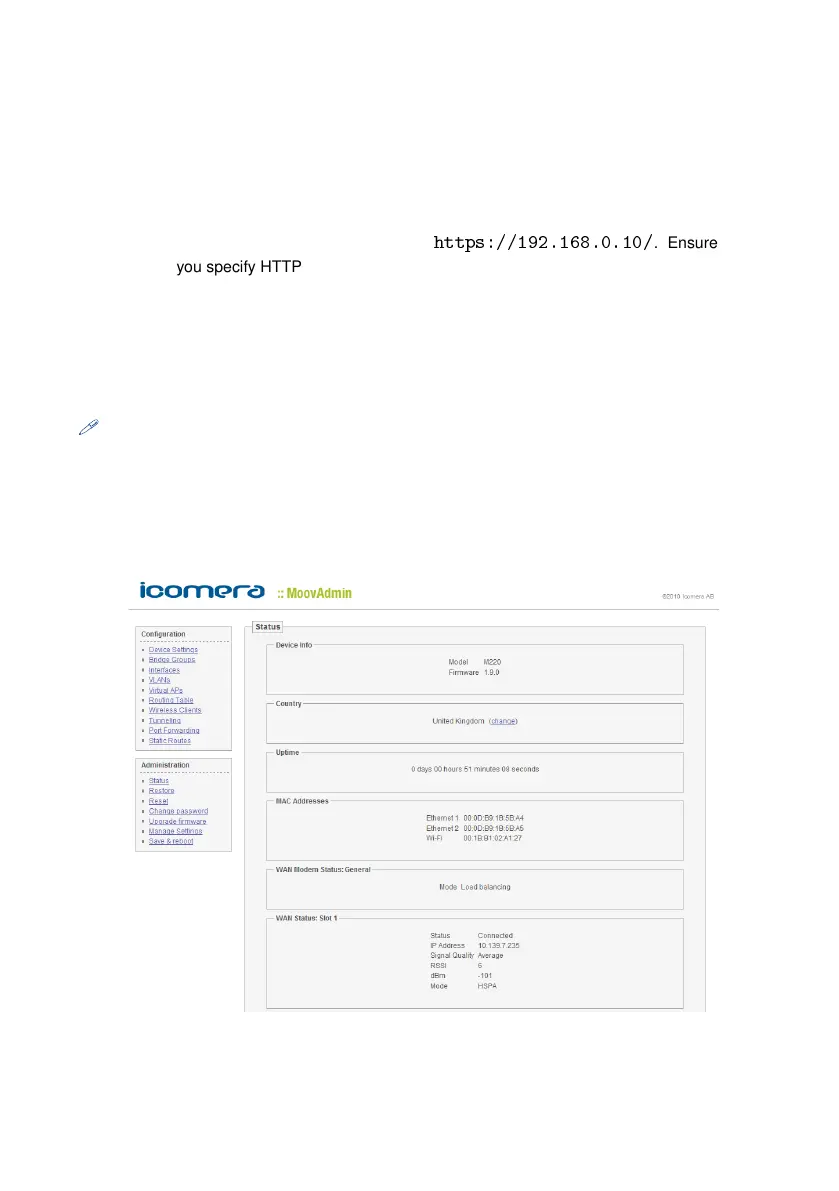
After connecting, the MoovAdmin Status page will appear and you are ready to con-
figure the device. If you cannot log into your Moovbox, please refer to the Trou-
bleshooting section.
Figure 2.6: The MoovAdmin status page


 To Next Page