CHAPTER 2. GETTING STARTED 10
2.7 Attaching the antennas
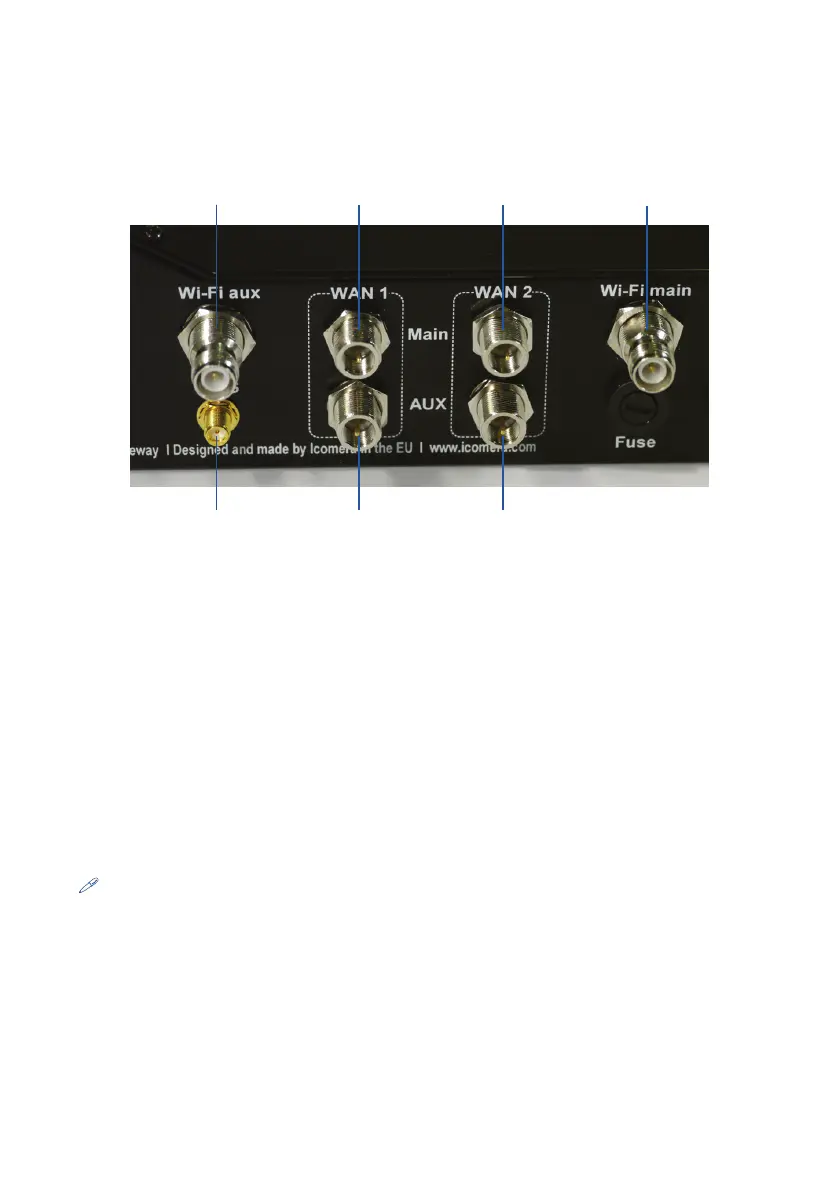
Wi-Fi main antenna
WAN 2 main antenna
WAN 1 main antenna
Wi-Fi aux antenna
GPS antenna WAN 1 aux antenna WAN 2 aux antenna
Figure 2.5: Antenna connectors
Wi-Fi
Your Moovbox is supplied with one 3dBi omnidirectional antenna (a second for di-
versity is available from you supplier SKU 3000000001) which should provide good
coverage for most in-vehicle and in-building deployments. Simply attach the antenna
to the Moovbox connector marked ‘Wi-Fi Main’. The antenna has a tilt and swivel
joint enabling you to adjust it for optimal coverage. However some installations may
require an alternative antenna such as a directional button, patch or panel type. Con-
tact your supplier for more information about different Wi-Fi antennas available.
Note: The Moovbox WI-Fi connectors are RP-TNC. If you plan to use a different
antenna to that supplied, ensure it has an RP-TNC plug connector.
WAN
As described above you will need an external cellular antenna compatible with the
carrier network you wish to connect to. For example this may be a GSM/3G antenna


 To Next Page