2 Getting Started
The Moovbox package contains almost everything you need to start delivering Inter-
net connectivity on the move. This section will help you get your Moovbox set up and
configured.
2.1 Unpacking the Moovbox
You should have received a box containing the following items:
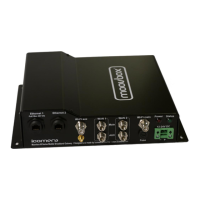
• 1 x Moovbox M220 mobile broadband gateway
• 1 x Wi-Fi 3dBi ‘rubber duck’ antenna with RP-TNC connector (a second for
diversity is available from you supplier SKU 3000000001)
• 1 x RJ-45 Ethernet crossover cable (1m)
• 1 x Quick Start Guide
• 1 x Torx key
• 1 x Bag of PCI express mini card screws (Note the longer screws are for the
Icomera add on board)
Please check that you have all of these items before continuing. If anything is miss-
ing, please contact your supplier. You will also need the following additional items:
2.2 Power Supply
Depending on your installation environment, you can either power the Moovbox via
the 12-36V DC Molex power input, or via a Power-over-Ethernet (PoE) adapter. Use
only an Icomera recommended M220 PoE as listed below. If you are unsure of what
type of power source you should use, or do not have access to either, please contact
your supplier. Options include:
• In-vehicle 12VDC cigarette lighter adapter (SKU 3000000004)
5


 To Next Page