QUICK START
UNPACKING
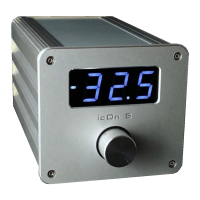
• Carefully unpack your icOn 5
• Keep the packing for future transportation
• Please treat the acrylic window surface on the faceplate with care
• Position the icOn 5 on a stable base.
CABLING
This icOn 5 Balanced has 3 pair XLR & 2 pair XLR output sockets. Please
double check the proper connection of the input and output cables
according to the actual I/O conguration.
• Switch off the icOn preamp and all appliances of your system
• Connect the icOn 5 with your amplier
• Connect the icOn 5 with your source components
• While changing cables your power amplier should be switched
off.
• If you have the I/O Extender unit too, please read the addendum at the
end.
• Default values for all functions are programmed
• Default input: IN1
• Default outputs: OUT1
• Volume: -40 dB
• Balance: 0 dB, input buffer is ON
• The IN2 can work as an AV bypass input. When AV bypass is
activated, from this input the signal goes to the output(s) without any
attenuation (0 dB). Please double check the cabling and the connected
AV source in this case!
• No additional programming is required for the start-up.
SWITCH-ON
• Switch-on the icOn 5 on the back plate’s power switch
• Select a moderate volume level or leave at the initial -40dB
• Switch-on your source components and last your power amplier
• Double check the cabling before switch-on.
2


 To Next Page