10
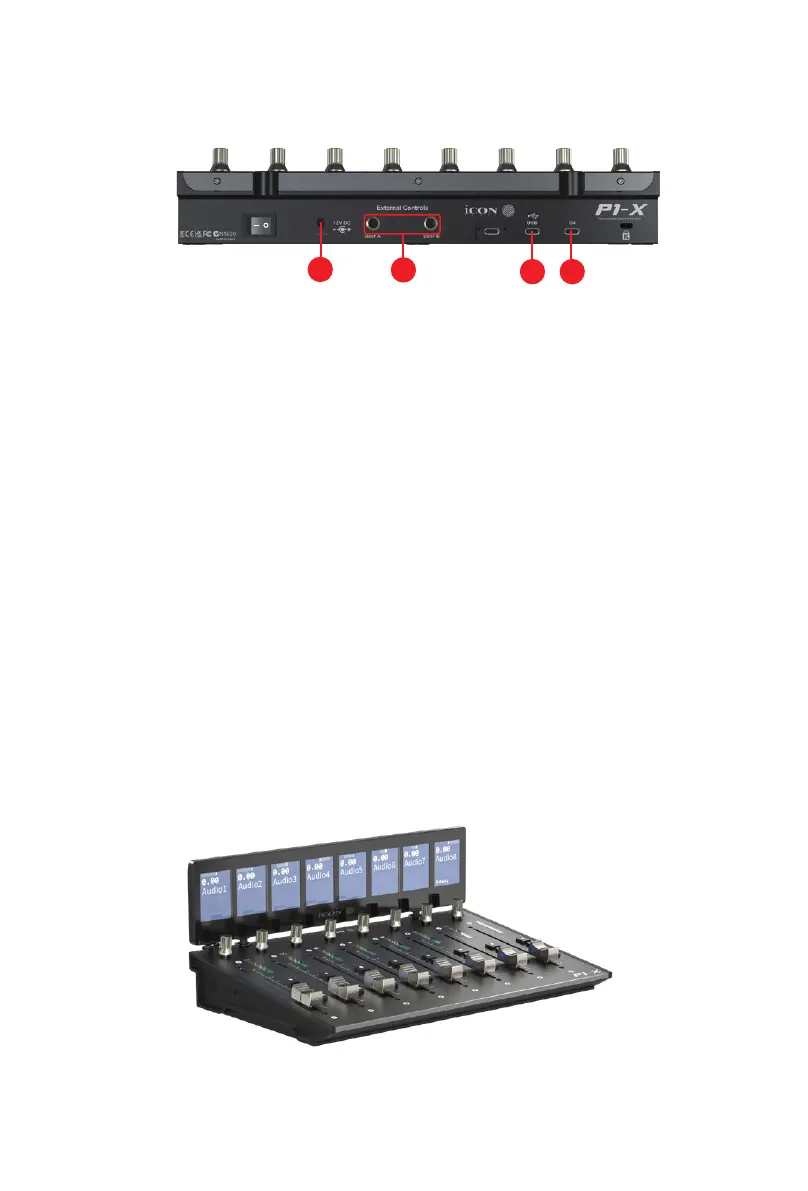
Rear Panel Layout
1. USB C port
Functions as a MIDI port to your computer and compatible software.
2. 12V/2.5A power adapter port
Connect the power adaptor provided, here.
(Note: the P1-M is not able to work without the provided power adaptor
connected. USB bus power from a computer is insucient).
3. User A / User B ¼ inch inputs
These ¼ inch inputs are used to connect to foot pedals to activate selected
functions in your DAW. To set their parameters, select USER A and USER B
parameters in your DAW.
4. D4 display unit connector
Connect your optional D4 display module to this connector with the provided
cable. The D4 displays a range of DAW dependent information as well as digital
metering. The D4 OLED makes adjusting parameters of plugs-ins and EQ easy,
with less staring at your DAW and more interaction with your DAW controller!


 To Next Page