20
The iMAP
TM
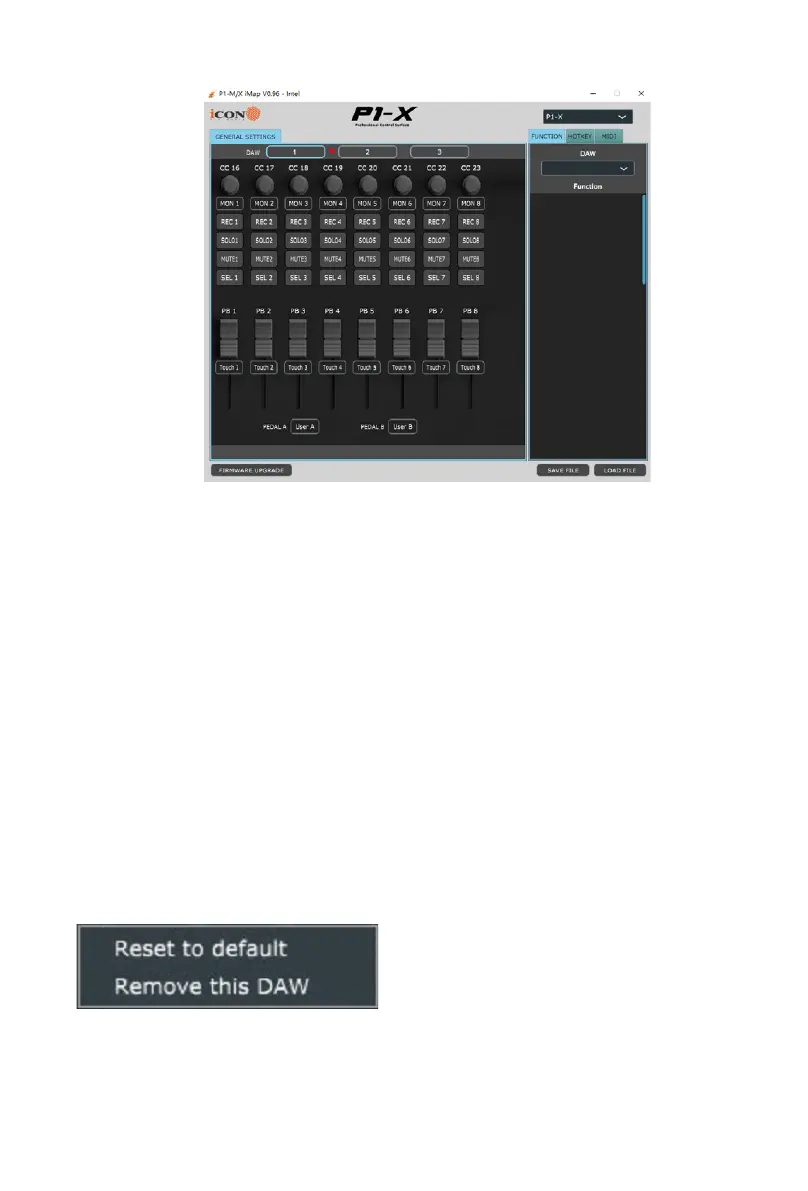
The intelligent design of the new, highly advanced iMap means that users can make
changes in real time.
Please note that you must click on the 'title' of the iMAP to change the
controller you are programming. In order to change the programming of the
P1-X, click the title 'P1-M' to change it to 'P1-M' and vice versa.
Sending your own MIDI messages
You may adjust "Pitch”, “Note”, “CC”, “Channel” and “Message” values for MCP and
“Value 1”, “Value 2” and “Function” for HUI, depending on the control element. The
results will be transmitted to the P1-X instantaneously! Users may use the iMAP
to program their own MIDI messages to both the faders and the rotary encoders,
(buttons are covered by the touchscreen on the main unit – please see the manual
for details).
On the iMAP, right-click the switchgear to ‘Reset to default’ values (i.e. the initial
value of the current DAW mode you are in), if you decide you no longer wish to retain
your MIDI mapping choices.
Please note that when using ‘Bitwig,’ right-clicking on any encoder and selecting
‘restore to default’ will result in all switchgear, (and the touchscreen on the main unit)
reverting to their initial values.
Equally, selecting an alternative DAW (DAW buttons 1-3) will ‘overwrite’ any user
programming to that of the selected DAW.


 To Next Page