18
Installing iMap
TM
for Windows
Please register your device, visit your Personal User Center at www.
iconproaudio.com and download the iMAP. iMAP is also available on the
product page on the website www.iconproaudio.com.
Note:
There is one iMAP for both the P1-M and P1-X - you can swap between the
two versions by clicking the "title".
Please follow the procedures below step-by-step to install your iMap
TM
software.
1. Turn on your PC.
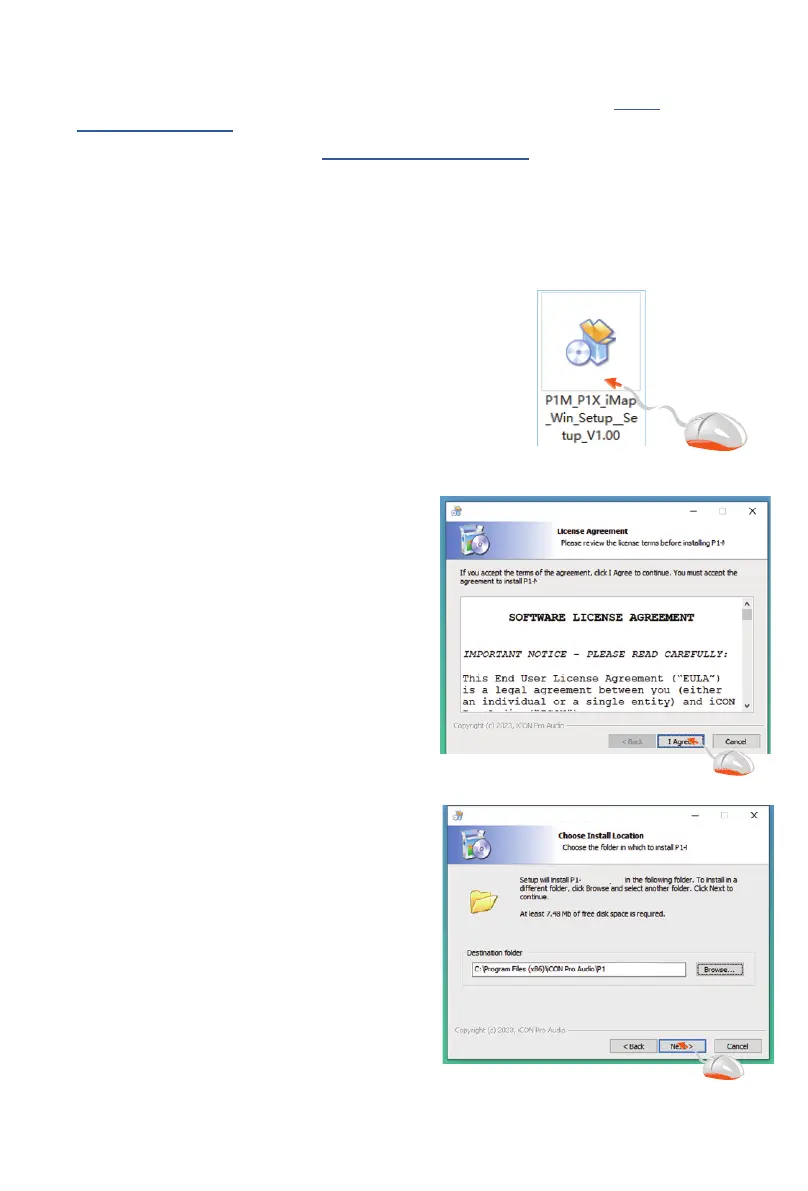
2. Download the iMap from your
Personal User Center at www.
iconproaudio.com
After you download the le, please click
it to start the installation process.
4. Choose Install Location
Choose your preferred install location
for iMap
TM
or use the default location
and click “Next”
1
2
3
4
5 6
7
P1-M P1-X iMap V1.00 Installation
P1-M P1-X iMap V1.00 Installation
P1-M P1-X iMap V1.00 Installation
P1-M P1-X iMap
P1-M P1-X iMap V1.00 Installation
P1-M P1-X iMap V1.00 Installation
M P1-X iMap shortcuts
M P1-X iMap.
M P1-X iMap.
M P1-X iMap
-M P1-X iMap
-M P1-Xi Map\
M P1-X iMap.
M P1-X
M P1-X
P1-M P1-X iMap V1.00 Installation
P1-M P1-X iMap V1.00 Installation
P1-M P1-X iMap V1.00 Installation
P1-M P1-X iMap
P1-M P1-X iMap V1.00 Installation
P1-M P1-X iMap V1.00 Installation
M P1-X iMap shortcuts
M P1-X iMap.
M P1-X iMap.
M P1-X iMap
-M P1-X iMap
-M P1-Xi Map\
M P1-X iMap.
1
2
3
4
5 6
7
P1-M P1-X iMap V1.00 Installation
P1-M P1-X iMap V1.00 Installation
P1-M P1-X iMap V1.00 Installation
P1-M P1-X iMap
P1-M P1-X iMap V1.00 Installation
P1-M P1-X iMap V1.00 Installation
M P1-X iMap shortcuts
M P1-X iMap.
M P1-X iMap.
M P1-X iMap
-M P1-X iMap
-M P1-Xi Map\
M P1-X iMap.
M P1-X
M P1-X
3. The Setup Wizard will appear
Setup wizard appears, please click
“Next”


 To Next Page