37
Esc
F1
F2
F3
F4
F5
F6
F7
F8
F9
F10
F11
F12
Prtsc
sysrq
pause
Break
Lns
Del
Home
Pgup
PgDN
End
$
~
`
!
1
··
2
3
4
5
6
7
78
9
0
)
)
*
—
-
+
=
#
¥
%
*
#
#
Q
W
E
R
T
Y
U
I
O
P
{
}
|
A
S
D
F
G
H
J
K
L
:
;
Z
X
C
V
B
N
M
<
>
?
Tab
CapsLook
Shift
Ctrl
Alt AltGr
Ctrl
Backspace
[
]
|
Enter
Shift
intel
Nuendo
Cubase
Samplitude
Ableton Live
Reaper
Studio One
Reason
Bitwig
Sonar
Audition
FL Studio
Digital Performer
MCP HUI
User define
User define
Pro Tools
Logic Pro
Logic Pro
4
Logic ProMCP HUI User define
Platform B+
3
2
1
Getting Started
(Standalone)
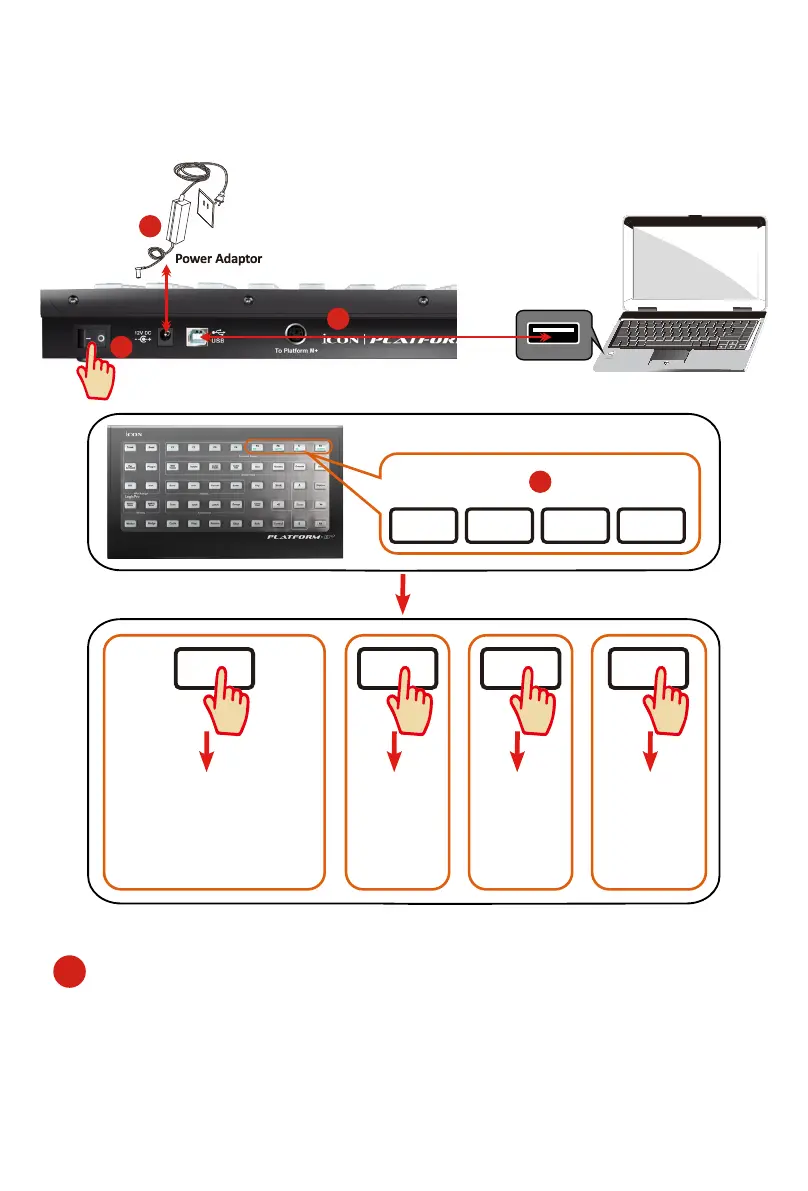
Connecting Your Platform B+ Controller
1. Connect the Platform B+ to your Mac/PC via the USB port.
Choose a USB port on your Mac/PC and insert the wide (at) end of the USB cable.
Connect the cable’s other end to the Platform B+. Your Mac/PC should automatically
“detect” the new hardware and notify you that it is ready to use.
1


 To Next Page