COMP DIRECT
OUT
MIX
HP
MONITOR
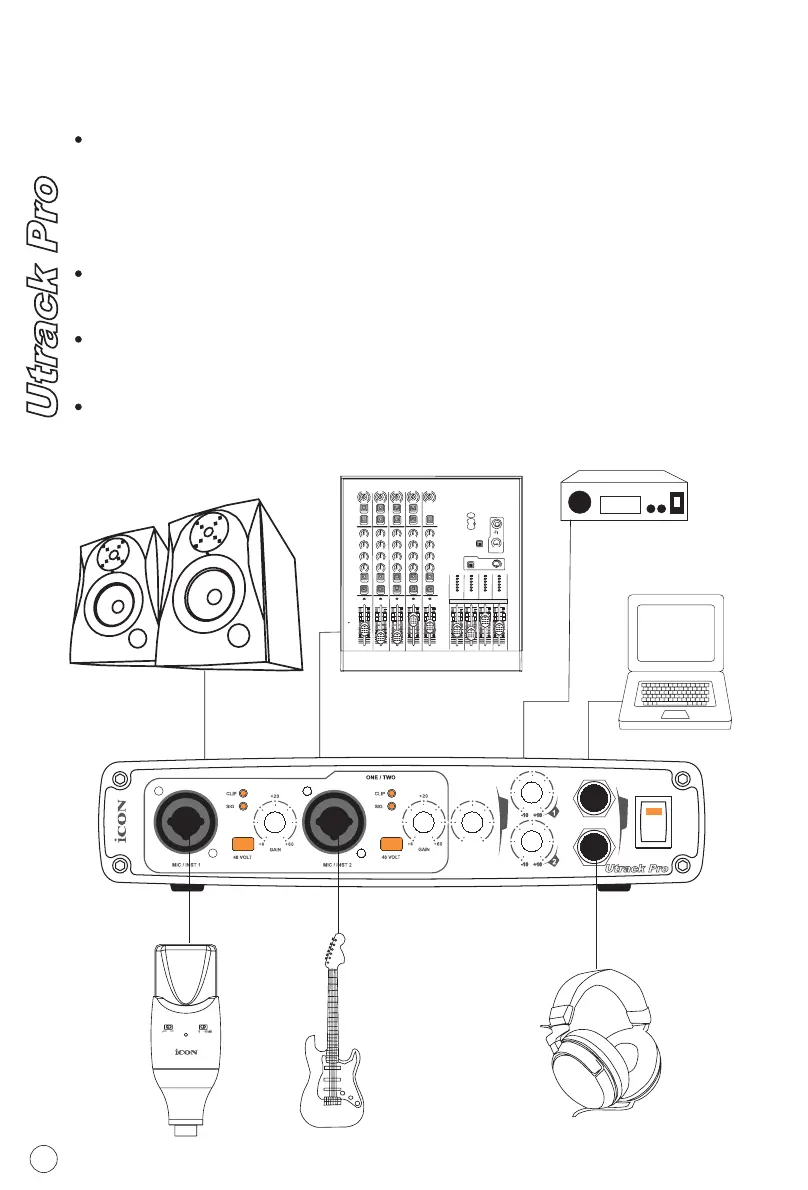
Hardware Connections
Connect the Utrack Pro's outputs to your amplifier, powered monitors or
surround system. For two-channel stereo operation, the default outputs
are channels 1 and 2. However, you may change this in the Utrack Pro
control panel at your desire. For multi-channel surround output, connect
up to four powered monitors to the Utrack Pro's four analog outputs.
If you are monitoring through headphones, connect one or two sets of
headphones to the Utrack Pro's headphone outputs.
Connect your microphones, instruments or other line level analog
sources to the Utrack Pro's front or rear panel analog inputs.
Connect your S/PDIF digital devices to the coaxial digital I/O.
MIC
LINE
-27
+27
GAIN
6dB
60dB
MIC
LINE
-27
+27
GAIN
6dB
60dB
MIC
LINE
-27
+27
GAIN
6dB
60dB
MIC
LINE
-27
+27
GAIN
6dB
60dB
MIC
LINE
-27
+27
GAIN
6dB
60dB
HPF
HPF
HPF HPF
HPFHPF HPF
HPF
HPF
0
HI
-15
+15
0
HI
-15
+15
0
HI
-15
+15
0
HI
-15
+15
0
-15
+15
0
HI
-15
+15
0
-15
+15
0
LOW
-15
+15
0
-15
+15
0
-15
+15
0
-15
+15
0
MID
-15
+15
0
-15
+15
MID
MID
0
-15
+15
MID
LOW
LOW LOW
0
-15
+15
MID
LOW
PAN
L
R
0
PAN
L
R
0
PAN
L
R
0
PAN
L
R
0
PAN
L
R
0
SOLO
SOLO
SOLO
SOLO
SOLO
MUTE3/4MUTE3/4MUTE3/4MUTE3/4
MUTE3/4MUTE3/4
MUTE3/4MUTE3/4
MUTE3/4MUTE3/4
PEAK PEAK
PEAK
PEAKPEAK
-15
0
-5
-10
-20
-30
-40
-50
8
dB
5
0
-5
-10
-20
-30
-40
-50
8
dB
5
0
-5
-10
-20
-30
-40
-50
8
dB
5
-15
0
-5
-10
-20
-30
-40
-50
8
dB
5
-15
0
-5
-10
-20
-30
-40
-50
8
dB
5
-15
0
-5
-10
-20
-30
-40
-50
8
dB
5
-15
0
-5
-10
-20
-30
-40
-50
8
dB
5
-15
0
-5
-10
-20
-30
-40
-50
8
dB
5
-15
0
-5
-10
-20
-30
-40
-50
8
dB
5
+14
+6
0
-6
-10
-20
+14
+6
0
-6
-10
-20
+14
+6
0
-6
-10
-20
+14
+6
0
-6
-10
-20
MIN
MAX
WETMONITOR
X
M
C/ROOM
+PHONES
+48V
PHANTOM
USB
Monitors
Mixer
Output
DAT
S/PDIF
Out
In
Audio
11


 To Next Page