MIDI I/O
S/PDIF
USB
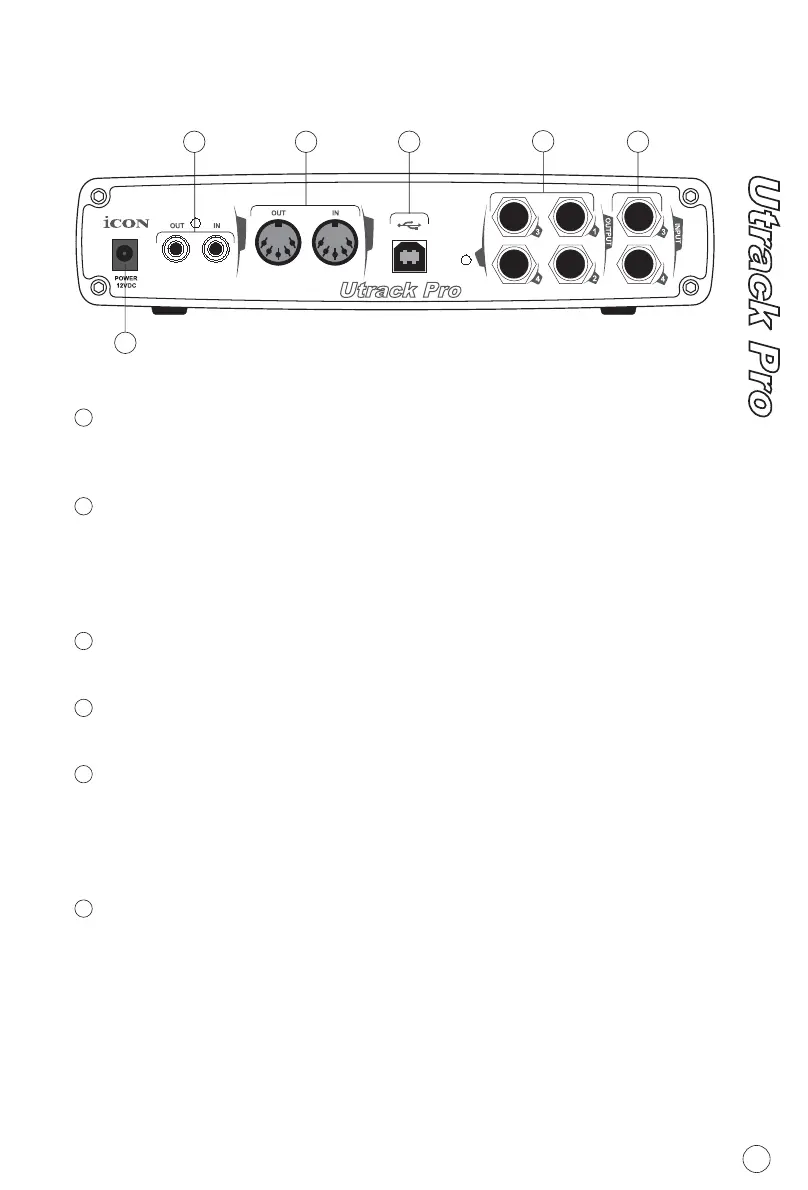
Rear Panel Layput
POWER SUPPLY CONNECTOR
S/PDIF COAXIAL IN AND OUT CONNECTORS
MIDI IN AND MIDI OUT CONNECTORS
USB CONNECTOR
LINE OUTPUTS 1-4
LINE INPUTS 3 AND 4
Connect the 12VDC power supply to this jack using an AC adaptor
provided.
S/PDIF digital input and output on coaxial RCA connectors. The
digital input is selected via the Utrack Pro's control panel, while the
digital output will be sent to the coaxial .
MIDI input and output on standard 5-pin DIN connectors.
Connect to your computer's USB port with the provided USB cable.
These are balanced analog outputs on standard 1/4" TS connectors
at +4dB line level. These outputs will support standard stereo, as well
as 4 mono You may assisg any of the input channels to any of the
output channels. These may assign on the control panel .
These are balanced analog inputs on standard 1/4" TS connectors
at +4dB line level.
.
1
2
3
4
5
6
1
2
3
4
5
6
4


 To Next Page