Page 14
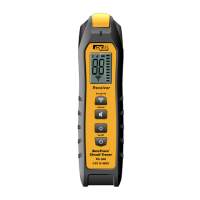
Receiver Callout Features RC-948
1. Super Bright Display – See below for details.
2. Sensitivity Mode:
Depress this button to select the mode of sensitivity*:
Mode RÇ-948 Antenna Strength
4 highest sensitivity (default mode)
3 high-medium sensitivity
2 medium-low sensitivity
1 lowest sensitivity for breakers
* See Additional Notes on next page for guidelines on mode selection.
3. Sensitivity Level
4. Mute Button – Short press this button to turn the sound On/Off. If
On is selected, a variable pitch/tone is produced –directly proportional
to the received signal strength.
5. NCV Function – Press to select Non-Contact Voltage
Note: Do not apply the Non-Contact Voltage sensing tip directly on
uninsulated hazardous live conductors.
WARNING
Arc Flash and Shock Hazard, Proper PPE Required. Check for the presence of
dangerous voltage with a measuring device to verify voltage levels prior to
working on the circuit. Failure to comply can result in serious injury or death.
6. Power Button – Long press to switch power on and enable operation.
Long press again to conserve battery power when not in use.
7. Battery Power – On the RC-948, remaining battery life is continuously
displayed on the main screen.
8. Work-Light – Short press power button to turn work light on or off
while the transmitter is powered on.
9. Battery Compartment – Holds (4) AA batteries.
10. Safety – Rated for use in Cat III-600V environments.
11. TightSight
®
Display
RC-948 Display
1. Super-bright FFSTN display (180° rotating).
2. CertainCircuit™ Indication if greater than 30V AC or 30V DC
is present
3. Mute indication.
4. Low Battery Indicator ( )
5. “0-99” numeric indication of signal strength.
6. Displays the sensitivity setting.
7. Peak detector shows instantaneous changes in signal strength.
8. Indicates NCV status
1
5
4
1
7
3
2
4
5
9
11
10
6 / 8
2
3
6
8
7


 To Next Page