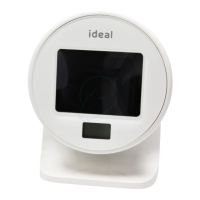
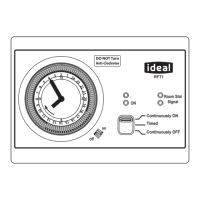
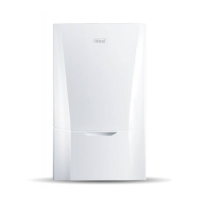
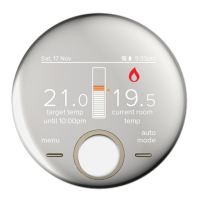
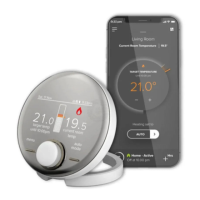
The Ideal Touch smart thermostat is a wireless room thermostat designed to control both central heating and domestic hot water (DHW) for single-zone systems. It is compatible with Logic Heat H, Logic Max Heat H, Logic System S, Logic Max System S, Vogue System, and Vogue Max System boilers.
Function Description:
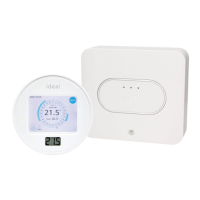
The Ideal Touch thermostat allows users to manage their home's heating and hot water schedules with precision. It features a 7-day programmable control for both central heating and hot water, offering up to 6 programmable ON/OFF periods each day. The thermostat delivers maximum boiler operating efficiency and automatically updates for summer/winter time (GMT/BST). It includes a "Boost" function for temporary heating or hot water, and a "Tap to wake" feature for easy interaction. The system operates wirelessly, with the thermostat communicating with an Ideal relay transceiver, which in turn controls the boiler.
Usage Features:
The thermostat boasts a simple user interface with a rotating outer wheel for adjustments.
Operating Modes:
The device offers three main operating modes for both central heating and hot water:
- Auto: Heating/hot water runs according to the user's set schedule.
- On: Heating/hot water is constantly on. For central heating, the outer wheel can be used to adjust the target temperature.
- Off: Heating/hot water is constantly off.
Setting the Time and Date:
To set the time or date, the user taps the screen to wake it up, presses "MENU," then "HELP & SETTINGS." From there, they select "CHANGE TIME" or "CHANGE DATE" and use the up and down arrows to make adjustments, confirming with "DONE."
Changing Central Heating Schedule:
The thermostat comes with a pre-programmed default heating schedule that can be easily modified.
- Wake the screen and press "MENU."
- Select "HEATING SCHEDULE."
- Press "MODIFY."
- Select the desired days for modification (e.g., MON, TUE, WED, THU, FRI, SAT, SUN) and press "NEXT."
- Set the ON time for the first period using the arrows and press "DONE."
- Set the OFF time for the first period using the arrows and press "DONE."
- Set the target temperature for the first period using the + and - buttons and press "DONE."
- Users can choose to modify a second heating period by pressing "YES" or finish by pressing "NO."
- After setting all periods, press "DONE."
Reviewing Central Heating Schedule:
To review the schedule, users wake the screen, press "MENU," then "HEATING SCHEDULE," and finally "REVIEW." They can navigate through days using "NEXT" and "EDIT" to make changes.
Overriding Central Heating:
This feature allows users to set the heating to be ON or OFF until a specified time.
- Wake the screen and press "MENU."
- Select "OVERRIDE HEATING."
- Choose "TURN HEATING ON UNTIL..." or "KEEP HEATING OFF UNTIL..."
- Set the desired time using the arrows and press "DONE."
The override period will be indicated by blue tappets on the display.
Cancelling Central Heating Override:
- Wake the screen and press "MENU."
- Select "CANCEL OVERRIDE."
- Confirm the cancellation by selecting the appropriate option.
- Press "DONE."
Central Heating Boost:
Boosting the central heating will maintain the desired target temperature until the next scheduled heating ON period. After this, the thermostat reverts to the programmed schedule. To activate, simply rotate the outer wheel until the desired room temperature is displayed.
Changing Hot Water Schedule:
Similar to central heating, the hot water schedule can be modified:
- Wake the screen and press "MENU."
- Select "HOT WATER SCHEDULE."
- Press "MODIFY."
- Select the desired days and press "NEXT."
- Set the ON time for the first period and press "DONE."
- Set the OFF time for the first period and press "DONE."
- Users can choose to modify a second hot water period by pressing "YES" or finish by pressing "NO."
- After setting all periods, press "DONE."
Reviewing Hot Water Schedule:
To review, users wake the screen, press "MENU," then "HOT WATER SCHEDULE," and finally "REVIEW." They can navigate through days and edit as needed.
Overriding Hot Water:
This allows users to set hot water to be ON or OFF until a specified time.
- Wake the screen and press "MENU."
- Select "OVERRIDE HOT WATER."
- Choose "TURN HOT WATER OFF UNTIL..." or "KEEP HOT WATER ON UNTIL..."
- Set the desired time using the arrows and press "DONE."
Cancelling Hot Water Override:
- Wake the screen and press "MENU."
- Select "CANCEL OVERRIDE."
- Confirm the cancellation.
- Press "DONE."
Maintenance Features:
Thermostat Location Guidelines:
For optimal performance, the thermostat should be:
- Less than 20 meters from the Ideal relay transceiver.
- Separated by no more than 3 walls and ceilings from the transceiver.
- Not near large metallic objects, large mirrors, or windows.
- Not positioned along walls running parallel to the RF path.
- Not within 1 meter of a Wi-Fi booster/router.
- Not placed near draughts, direct sunlight, or other heat sources.
Ideal Relay Transceiver:
The relay transceiver, usually located near the hot water cylinder, has three indicator lights:
- Radio Frequency (RF) connection (green): Indicates connection to the thermostat. If off, refer to location guidelines.
- Power (green): Indicates power supply to the transceiver. If off, contact an installer.
- Opentherm connection (green): Indicates correct connection to the boiler. If off, contact an installer.
Normal operation is indicated when all three green lights are illuminated.
Troubleshooting:
The thermostat provides on-screen fault indications. If a warning triangle appears, pressing it will provide further information. Common issues and their solutions include:
- Radiators not switching off: Check if the thermostat is set to "On." Rotate the outer wheel anti-clockwise until the target temperature is below the actual temperature.
- Radiators not switching on: Check if the thermostat is set to "On" or "Auto." If "Auto," ensure it's within a scheduled "on" period (blue tappets) and rotate the outer wheel clockwise until the target temperature is above the actual temperature.
- No hot water: Check if hot water is set to "On" or "Auto." Review hot water "on" times if necessary.
- Screen not lighting up: Wait 10 seconds, then press the screen again. If it remains blank, replace the batteries.
- Warning triangle showing: Press the warning triangle. If "Zone 1 Fault" is shown, refer to location guidelines. If "Boiler Fault" is shown, check the boiler display and refer to the boiler installation manual.
- No response to temperature/time adjustments: Check the left-hand light on the relay transceiver. If it's off, refer to location guidelines.
Battery Replacement:
Batteries should last approximately 18 to 24 months. Only good quality alkaline batteries should be used. If batteries run out, central heating and hot water will continue to operate during set times, but room temperature control will become less accurate.
- Un-clip the thermostat from its cradle by sliding it upwards.
- Use a flat-bladed screwdriver to remove the rear cover.
- Replace the batteries and refit the battery cover.
Warranty:
All Ideal Touch Controls come with a 12-month Ideal warranty, covering mechanical or electrical breakdowns due to defective workmanship or materials. The warranty starts from the installation date (or manufacturing date if proof of purchase is unavailable). Installation must be registered within 30 days at www.idealboilers.com. The warranty does not cover damage from deliberate action, accident, misuse, third-party interference, modifications, failed batteries, or defects caused by design, installation, or maintenance of the central heating system. It also excludes costs incurred due to delays in fixing reported faults. All electrical installation and maintenance work must be carried out by a suitably qualified electrician.


 To Next Page

 General