14
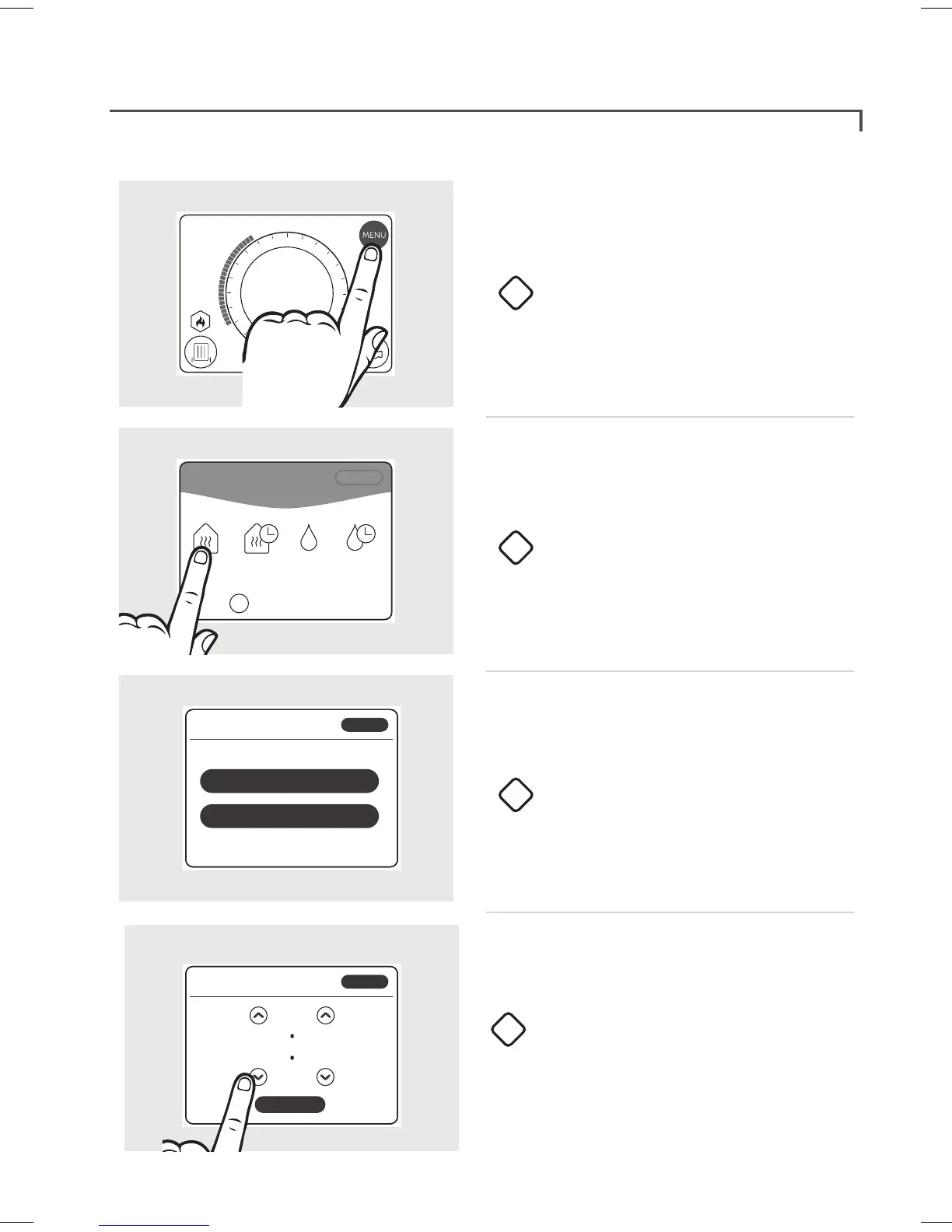
Override central heating
Tap screen to wake up.
Press MENU.
Press OVERRIDE HEATING.
Press the desired option.
1
2
3
O
On
Auto
TARGET
Zone: 1
ROOM TEMP
21 .5
22 .5
º
º
O
On
Auto
1
2
3
4
5
6
7
8
9
10
11
12
13
14
15
16
17
18
19
20
21
22
23
0
BACK
MAIN MENU
OVERRIDE
HEATING
HEATING
SCHEDULE
OVERRIDE
HOT WATER
HOT WATER
SCHEDULE
HELP & SETTINGS
?
Set the time required using the up
and down arrows.
Press DONE.
4
What would you like to do?
BACK
KEEP HEATING OFF UNTIL ...
TURN HEATING ON UNTIL ...
Keep heating on until...
DONE
05 00
BACK
Overriding the central heating will set your heating on or o until the time you specify.


 To Next Page