5
Battery Replacement
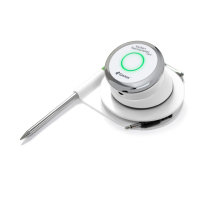
To replace your Kitchen Thermometer
mini
battery, follow these steps:
• Separate the Kitchen Thermometer
mini
from its base by rmly
holding the base with one hand and gently pull the Kitchen
Thermometer
mini
top upwards with the other hand.
• On the underside of the Kitchen Thermometer
mini
, remove the
battery door by twisting it counter-clockwise
• Replace the battery with a CR2032 coin cell battery (available at
local drugstores in the specialty battery section).
• Ensure the battery is in place and replace the battery door.
Powering On & Off
To turn on the Kitchen Thermometer
mini
, follow these steps:
• Press the power button located at the center of the faceplate.
• The Smart LED will blink blue while waiting for pairing.
To turn off the Kitchen Thermometer
mini
, follow these steps:
• Press and hold down the power button located in the center of the
faceplate for three seconds.
• The Smart LED will illuminate solid white and will then turn off.
Auto Shut-Off:
• The Kitchen Thermometer
mini
will stay powered on for ve minutes
before automatically turning off if there is no probe installed and it is
not paired to a smart device.
• The Kitchen Thermometer
mini
will stay powered on for eight hours
before automatically turning off if not paired to a smart device and
the probe is installed.
• The Kitchen Thermometer
mini
will stay powered on until the battery
is depleted if it is paired with a smart device, even if there is no
probe installed.


 To Next Page