9
• Wrap your probe’s wire clockwise around the probe wrap.
• When you reach the adapter end of the probe wire, it can be
inserted into the probe wrap’s wire channel to secure the wrapping.
Using the Kitchen
Thermometer
mini
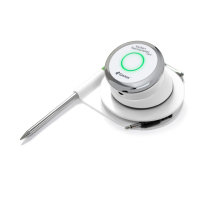
Smart LED
The Smart LED allows the Kitchen Thermometer
mini
to display the
connected probe temperature reading through the use of color. Below is a
list of all of the light combinations you will see on the Smart LED and their
associated meanings:
Connection
• Solid White: Powering off or reset complete
• Solid Blue: Conrms pairing of new device
• Blinking Blue: Awaiting pairing or no alarm set
Peak Preset
• Solid Green: Initial Temperature
• Solid Yellow: Target Temperature is 15° F away
• Solid Orange: Target Temperature is 5° F away
• Blinking Red: Target temperature reached
• Solid Red: Target temperature reached and alarm acknowledged
Range Preset
• Solid Green: Temperature inside range
• Blinking Red: Temperature outside range


 To Next Page