User Manual ToFscan 10
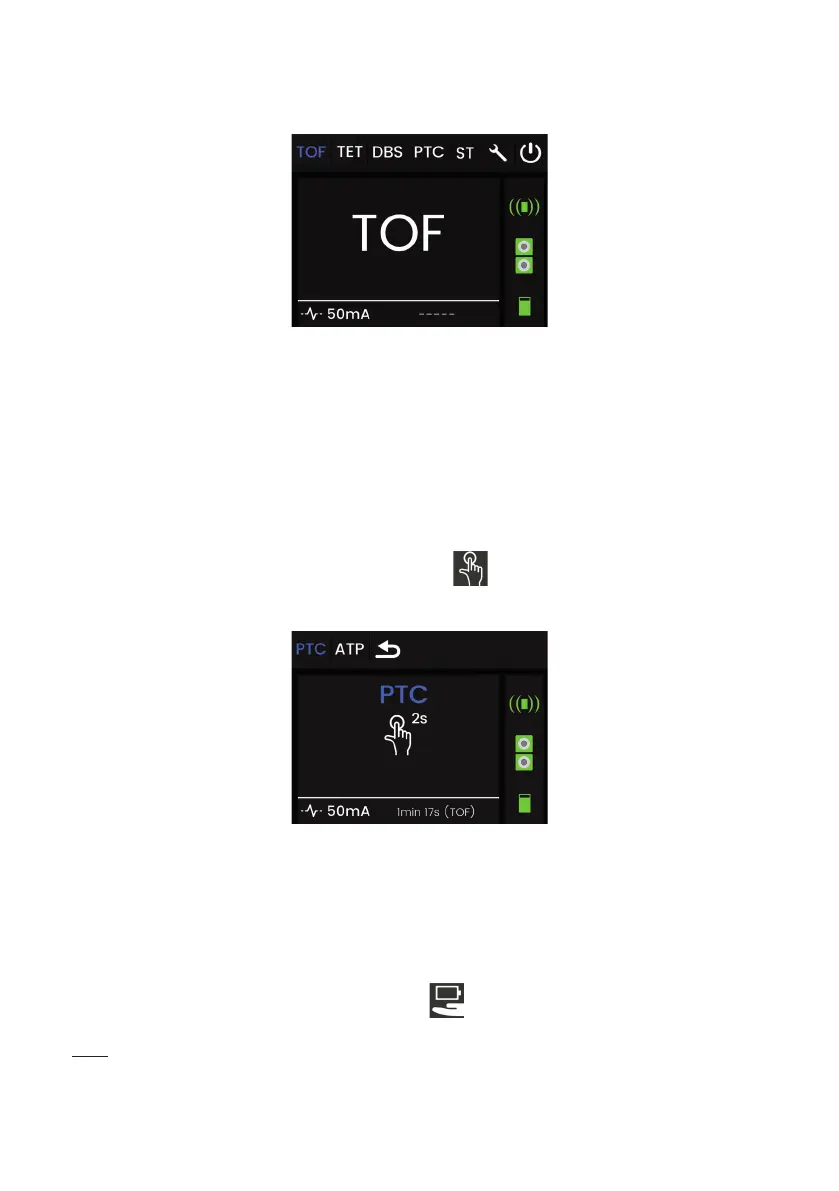
Main menu, Display screen
The various
stimulations
(or menu)
Stimulation
current selected
Switch off the device
Sensor cable
connection
Patient/Electrode
impedance
Battery level
Time expired since the last
selected measurement
Settings
Menu selection
The menus, options and various tests are accessed using the selection wheel on the front
of the ToFscan. The user navigates through the various menus by turning the wheel (clockwise or
anti-clockwise).
To select a menu or function, press the wheel an release the wheel button(holding it down for less
than 1 second).
To start a test or an electrical stimulation, to access the settings or switch off the device, press and
hold the wheel button for 2 seconds. The following icon
is displayed on the screen together with
the required time to hold down the button in order to start the stimulation.
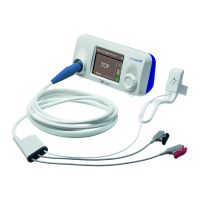
Example of the selection screen for starting the PTC mode:
Battery / AC power supply operation
The ToFscan carries a battery enabling it to function independently on battery power for
close to 1 month (for more information refer to the battery section). This battery is recharged by the
power supply provided with ToFscan.
The power supply unit can be used as a permanent mains power supply unit. This means
that the ToFscan will operate via its mains power supply unit without necessarily running down the
battery. In this operating mode, the ToFscan displays the results and all information continuously. It
will go into energy-saving mode 2 hours after it is last used or the last measurement is taken.
When ToFscan operates on battery “ECO” mode
can be activated by the user (for more
information on “ECO” mode refer to the section “Parameters Menu” “ECO”).
Note:
Position the ToFscan and the power supply in order to disconnect easily.
Fully charge the battery before the rst use.
If the power supply unit should malfunction, never use power supply units other than those
supplied by IDMED.


 To Next Page