User Manual ToFscan 9
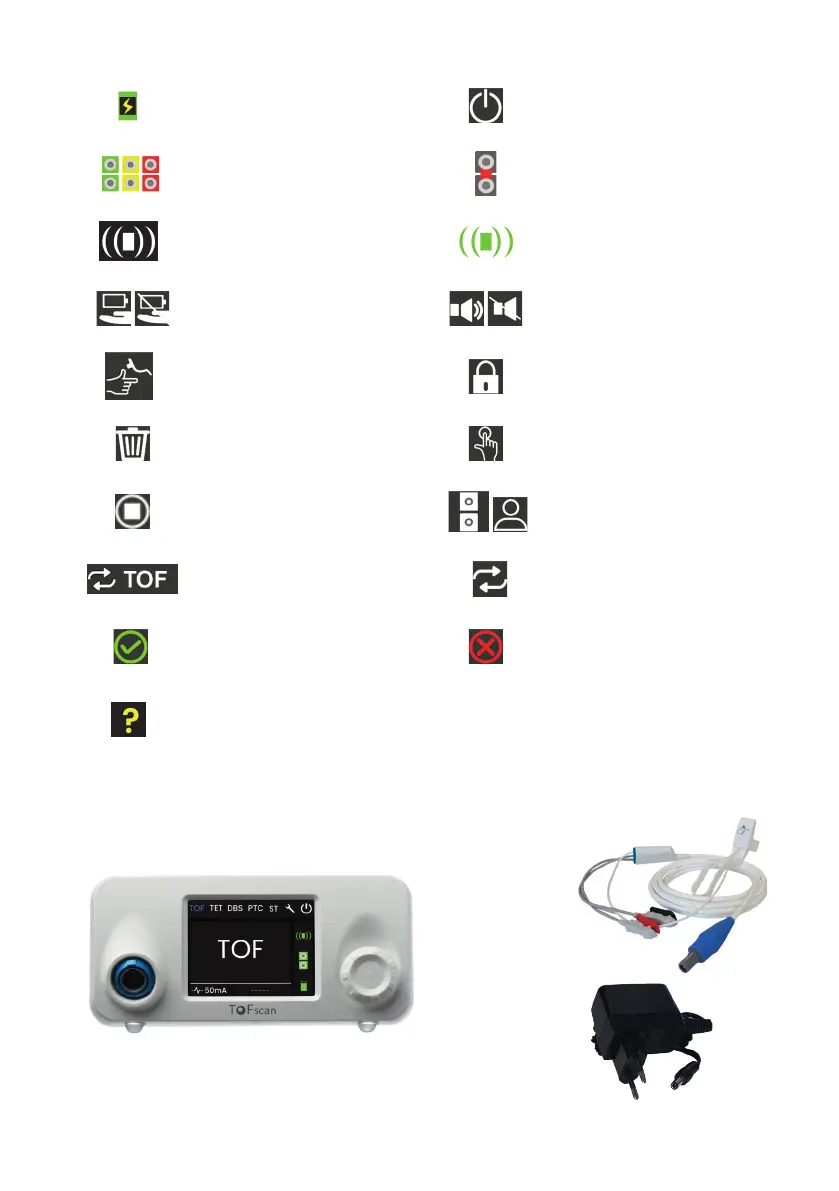
Symbol for battery charge in
progress / or operation on
mains adaptor
Switch off
Impedance Level Symbol
(green, yellow, red)
Short circuit condition of
electrode cable or electrodes
(grey)
Symbol for movement
connector not connected
(grey)
Symbol for movement
connector connected
(green)
ECO mode on/off
Sound on/off
Check the sensor position
Mandatory waiting time
before the next stimulation
Delete the reference value Hold down the button
Stop / Stop stimulation
Check the electrode patient
connection
Accessing Auto-TOF mode
Auto-TOF mode On
A reference value is available
No reference value is
registered
Disrupted measuring
conditions
I General information
Overview of the ToFscan and its accessories
Display screen
Power supply unit
Electrodes cable
/Thumb sensor
Electrode/
Sensor cable
Selection wheel


 To Next Page