User Manual ToFscan 17
TET mode
Tetanic stimulation or “TETANUS” stimulation is used to stimulate a patient for 5s at 50
Hz. As the ToFscan does not display a measurement at the end of this test, no user validation is
expected at the end of the stimulation in order to reactivate the selection wheel navigation function.
The patient’s motor response is not measured by the ToFscan sensor, but is visually gauged by the
user.
Note:
The waiting time required by the ToFscan between two “TET” stimulations is 3 minutes. The
“TET” stimulation is absolutely not recommended in case of the eyebrow muscle monitoring.
DBS mode
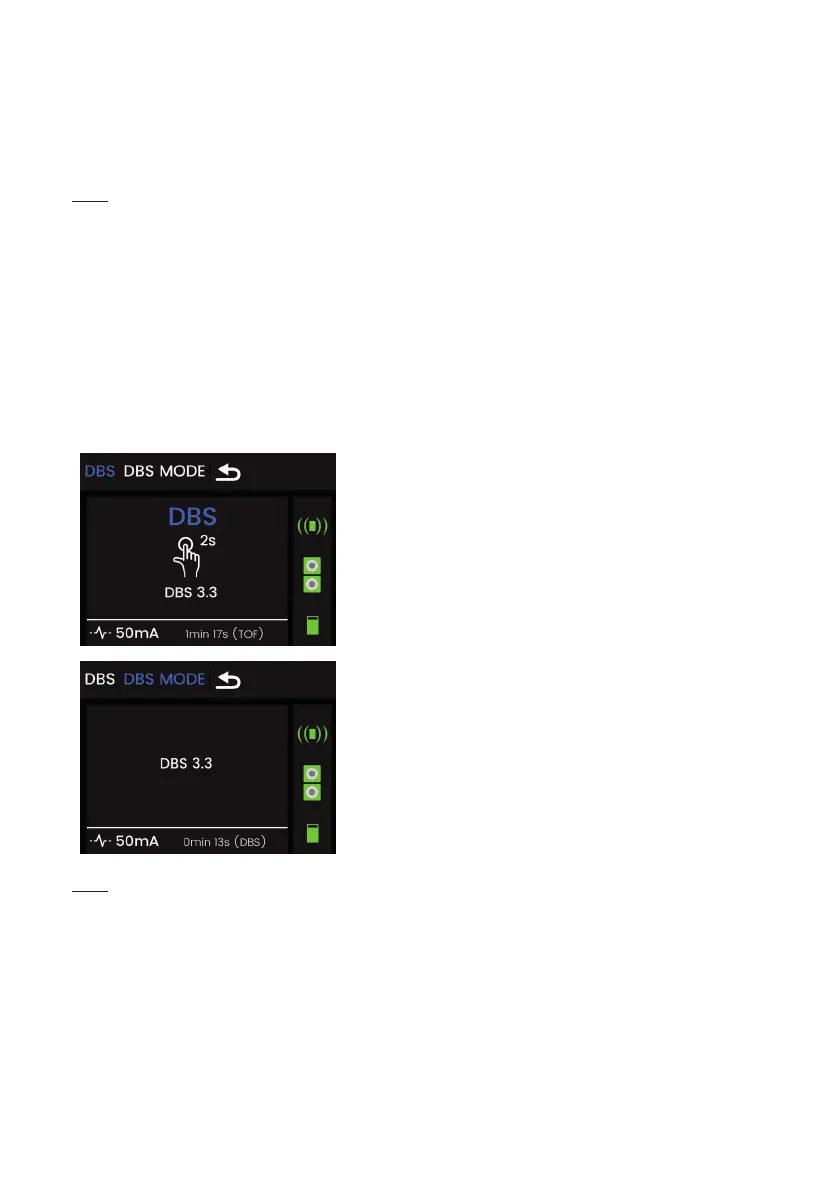
The ToFscan is used to perform “Double Burst Stimulations” or “DBS”. It offers the user
2 types of DBS mode under the “DBS MODE” menu. The DBS mode can help to detect a possible
residual blockade. DBS stimulations consist of two bursts of 50 hertz stimulations spaced 750 ms.
Depending on the selected DBS mode, each burst will have 2 or 3 impulses (impulse duration:
200 µs). After DBS stimulation applied, the number of responses measured is displayed with their
relative amplitudes by 2 white bars. The percentage of the ratio between the amplitude of the
second response and the rst is displayed at left side on the screen.
“DBS” sub-menu
The ToFscan provides “DBS 3.3” stimulation by default.
The user can activate this stimulation by pressing and
holding the selection wheel, or the “DBS 3.2” stimulation after
having selected it under the “DBS Mode” menu.
“DBS MODE” sub-menu
This menu is used to select the various types of DBS
stimulations. The ToFscan allows DBS 3.3 and DBS 3.2.
Note:
The waiting time after a “DBS” stimulation is 20 seconds. The « DBS » stimulation is
absolutely not recommended in case of the eyebrow muscle monitoring.
PTC Mode
“PTC” or “Post Tetanic Count” stimulation is generally used for deep neuromuscular block
or when there is no response to TOF stimulation. “PTC” stimulation comprises a 5-second “TETANUS”
stimulation at 50 Hz followed by a 3-second pause and then 10 “SINGLE TWITCH” stimulations.
“PTC” sub-menu
When selecting this sub-menu, the user starts PTC stimulation by pressing and holding
the selection wheel. Upon completion of the stimulation (18 seconds’ duration) the ToFscan displays


 To Next Page