EN
07 / ImportantNoteson
Reducing False Alarms
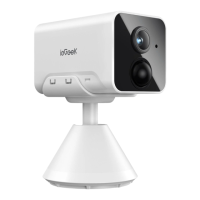
• Do not face the camera towards any objects with bright lights, including
sunshine, bright lamp lights, etc.
• Do not place the camera near any outlets, including the air conditioner
vents, humidififier outlets, the heat transfer vents of projectors, etc.
• Do not install the camera in places with strong wind.
• Do not face the camera towards a mirror.
• Keep the camera at least I meter away from any wireless devices, including
WiFi routers and phones in order to avoid wireless interference.
08 / FAQs
The device prompts ofine?
l. Check whether the equipment is in the power-on state, and observe
whether the working light of the equipment is on normally.
2. Confirm that the current location has good wifi coverage and the network
is stable, make sure that the wifi signal is above 85%. You can try to use
the third-party wifi analysis tool "wifi analyzer" to analyze the current wifi
signal coverage and interference status. If the coverage is poor and the
interference is large, it is recommended to replace the camera installation
position or adjust the router position or use a second-stage router.
3. If the device is located far away from the router, which results in the inability
to obtain a good Wi-Fi signal, it is recommended to move the router to a
closer place or ensure the Wi-Fi signal strength is to be over than 85% to
improve the Wi-Fi performance of the home.
4. Delete the camera from your ieGeek Cam account and add it again after
resetting the device. Check whether the device firmware and application
program are the latest version.
5. Avoid using wifi extenders.
Update router or Wi-Fi password?
Delete the camera from your ieGeek Cam account. After resetting the device,
use the new Wi-Fi and password to add it again.


 To Next Page
 Loading...