04
Function:
1.Display function
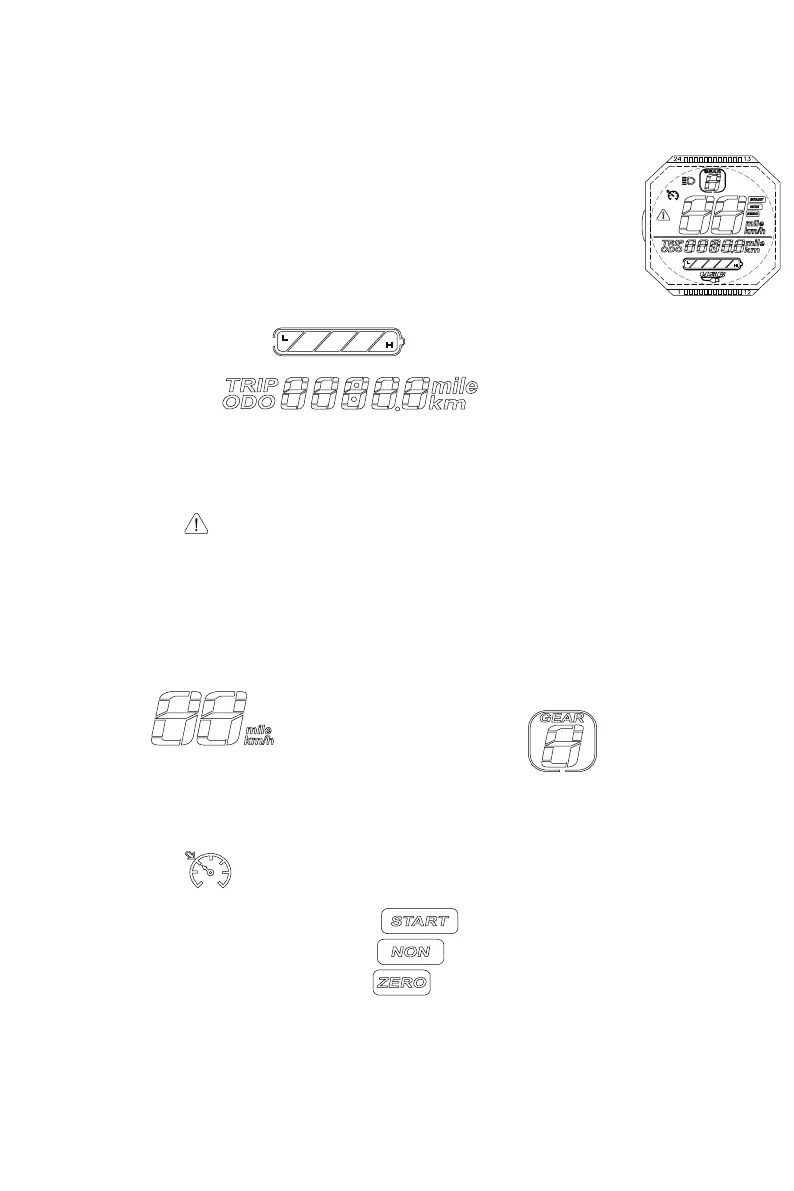
Speed Display, Battery Indicator, Fault Indicator, Headlight Indicator, Cruise Indicator,
Gear Indicator, Total Mileage, Single Mileage, Real-time Voltage, Operating Current,
Operating Time, Start Mode
2.Communication Protocol: UART
3.All display will be displayed within 1S after power on
Icon Display Introduction
1. Battery Bar
2. Multifunction Icon
Total Mileage ODO; Single Mileage TRIP; Real-time Voltage V; Running Current A; Running
Time TIME; Fault Code E
3. When the symbol is flashing, short press the ON/OFF button to adjust the display
interface to Fault Code E interface.
The corresponding number represents different fault, the details are as follows:
E01. Motor Hall Wire Status E02. Brake Failure E06. Undervoltage E07. Motor Failure
E08. Handlebar Failure E09. Controller Failure E010. Receiving Delay E011. Sending Failure
4. Speed Icon
MPH, KM/H
5. Gear Icon
Short press the MODE button to switch the gears cyclically.
The higher the gear, the faster the speed. (The motor will not run at gear 0.)
6. Cruise Icon
After the motor is running, keep the speed for 5 seconds and then the cruise
indicator lights up. After releasing the speed control handle, the motor keeps
running at the original speed. When you brake or accelerate again, the cruise
mode will end.
7. Start Method
Non-zero Start: NON indicator lights up
Zero Start: ZERO indicator lights up


 To Next Page