iA5
Using the
Getting Started
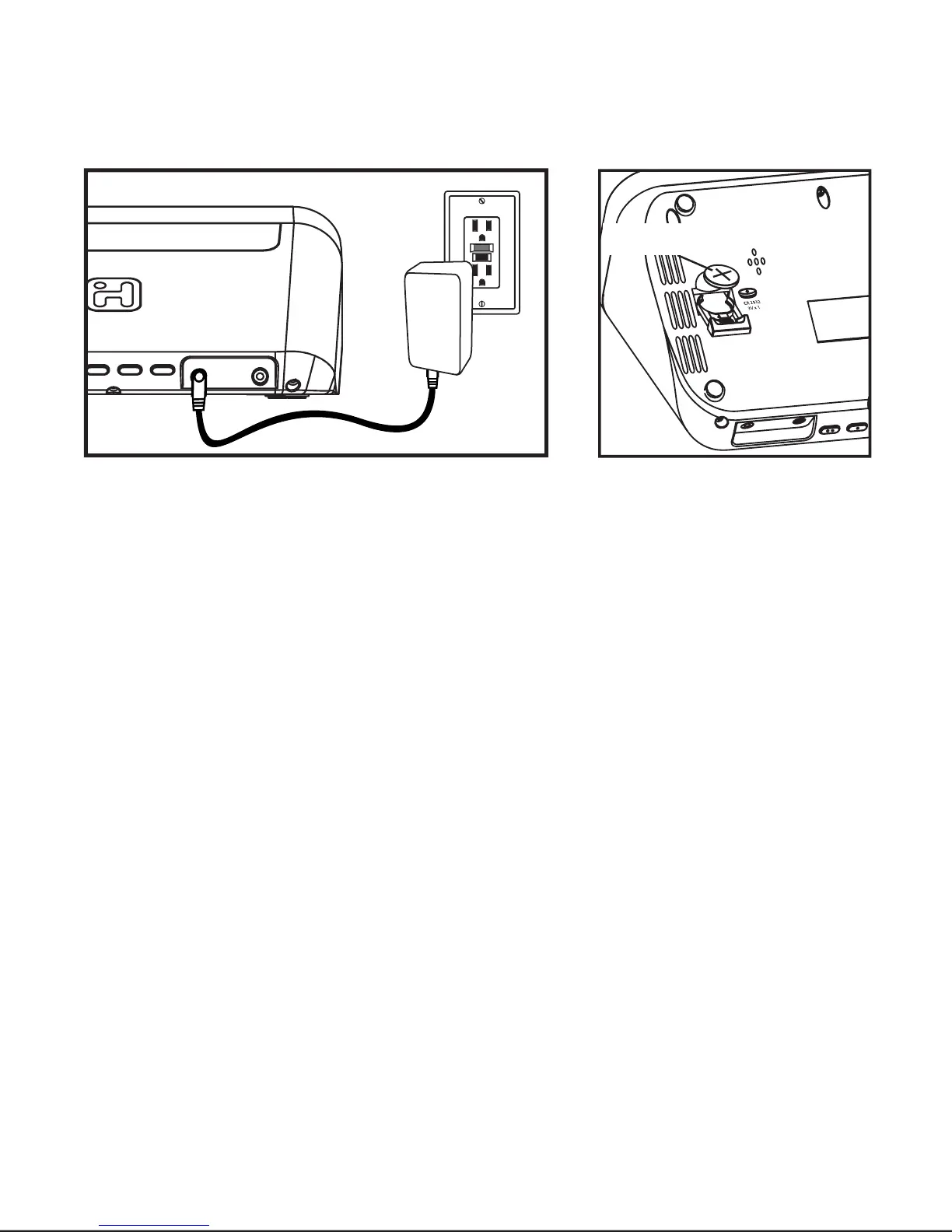
1.Plug the Ac adaptor into the DC jack on the back of the iA5
and the other end into a working outlet.
2.For battery backup, insert included CR2032 battery into
battery compartment on the bottom of the unit. Make sure
battery polarity (+/-) matches diagram. In the event of a
power failure, the backup battery will maintain clock and
alarm settings. When the battery low indicator appears on
the display, the battery needs to be replaced with a fresh
battery.
12
WARNING:
Lithium batteries can explode or cause burns if
disassembled, shorted, recharged, exposed to water, fire, or high
temperatures. Do not place loose batteries in a pocket, purse, or other
container containing metal objects, mix with used or other battery types,
or store with hazardous or combustible materials. Store in cool, dry,
ventilated area. Follow applicable laws and regulations for transport and
disposal.
3
RESET
RESET
TEST
TEST
CR2032



 To Next Page