4
BACKUP BATTERY (CONTINUED)
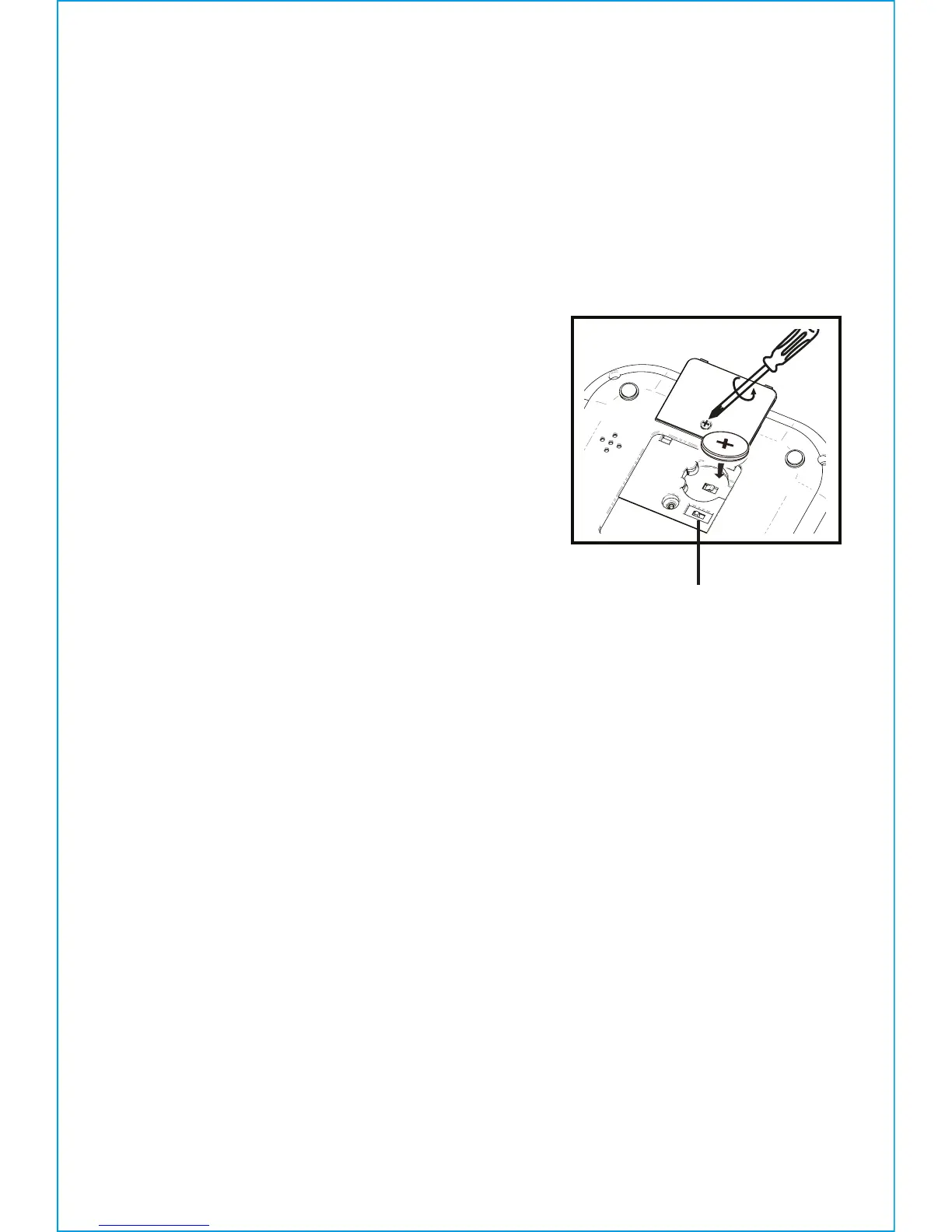
1. Please make sure the AC adaptor is connected. Otherwise all settings
may be lost during battery replacement.
2. Use a Phillips screwdriver to open the backup battery compartment
door located on the bottom of the unit.
3. Remove the exhausted battery. Insert a
new CR2450 battery by easing it under the
tabs in the battery well and pressing down.
Make sure the side marked + is facing up.
4. Close the battery compartment door and
tighten the battery door screw.
Note: Make sure you dispose of battery
properly (see your local regulations).
WARNING: Lithium batteries can explode or cause burns if disassembled,
shorted, recharged, exposed to water, fire, or high temperatures. Do not
place loose batteries in a pocket, purse, or other container containing metal
objects, mix with used or other battery types, or store with hazardous or
combustible materials. Store in cool, dry, ventilated area. Follow applicable
laws and regulations for transport and disposal.
DST switch


 To Next Page