Need help?
Do you have a question about the iHome IM14 and is the answer not in the manual?
Connect AC adapter to unit and wall outlet. Unit displays 12:00 PM.
Use Alarm ON/OFF Button to arm/disarm. Green LED indicates alarm is armed.
Hold Snooze Button to silence alarm & reset for next scheduled day.
Press Snooze Button to silence alarm for 9 minutes. Other buttons disabled.
Connect audio device via aux-in cable. Auto detect or manual power on.
Slide switch to lock buttons to prevent accidental presses. Lock icon appears.
Connect USB device to 1 Amp port. Unit must be connected to AC power.
Safety precautions for lithium backup batteries: handling, storage, and disposal.
 General
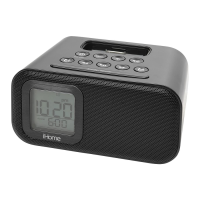
| Type | Alarm Clock |
|---|---|
| Brand | iHome |
| Model | IM14 |
| Bluetooth | Yes |
| Display Type | LED |
| USB Charging Port | Yes |
| Battery Backup | Yes |
| Snooze Function | Yes |
| Alarm | Yes |
| Power Source | AC Adapter |
| Speaker | Yes |
| Weight | 1.5 lbs |

 To Next Page