2
Installing and Replacing Clock Backup Batteries
The unit comes with 2 AA back-up batteries installed to provide continuous alarm operation
and clock settings in the event of a power failure. The battery compartment is located on
the bottom of the unit. Remove the battery pull tab before use. While the display is
generally disabled in battery backup mode, pressing the ZZZ (Snooze)/Display Dimmer
Button will show a dimmed time display for 5 seconds if power is interrupted and clock
back up batteries are installed. When the Battery Low Icon located on the lower right of
the display is flashing, it is time to replace the back-up batteries.
1. Please make sure the AC adaptor is connected, otherwise all settings will be lost during
battery replacement.
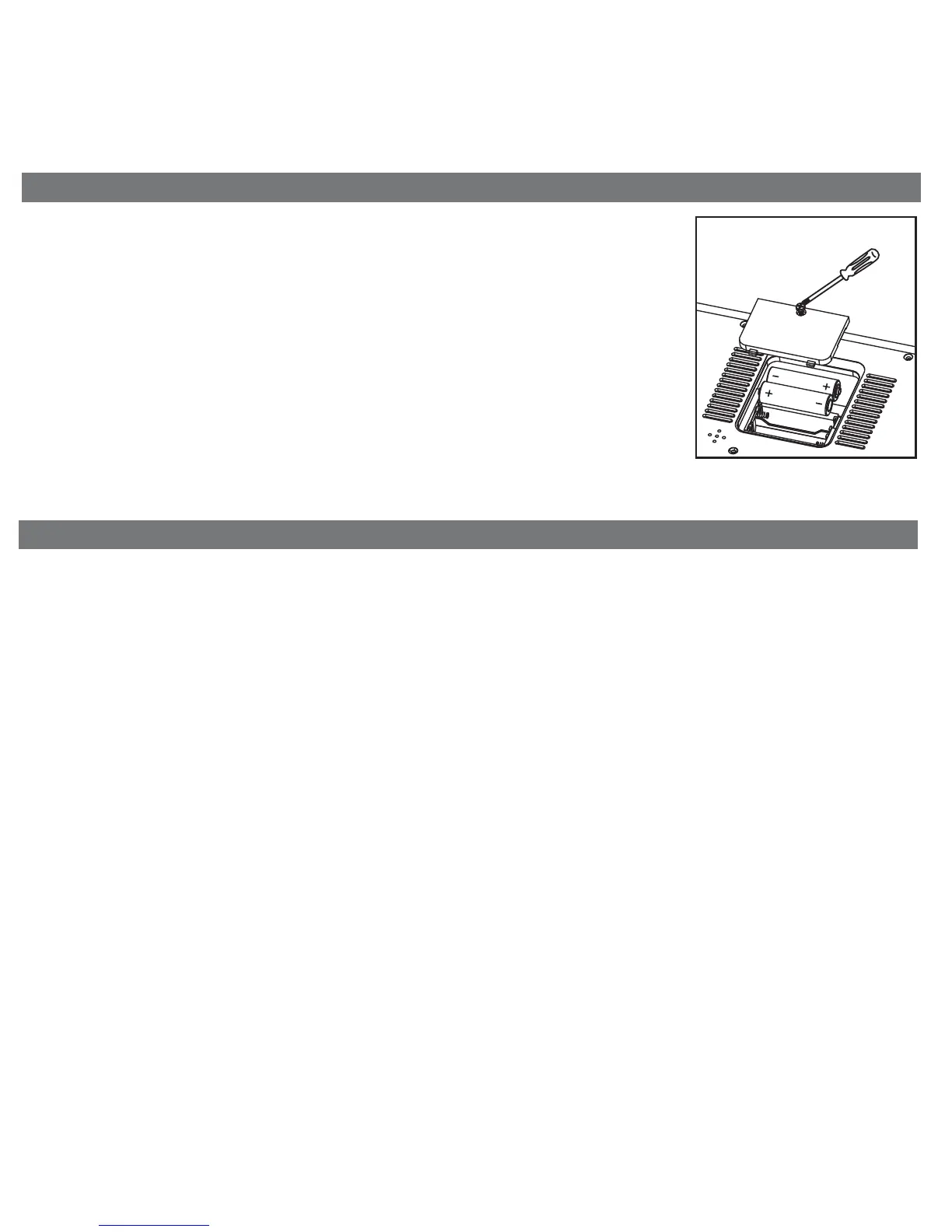
2. Use a Phillips screwdriver to remove the battery compartment cover located on the
bottom of the unit.
3. Remove the exhausted AA batteries. Insert fresh AA batteries, checking that the
polarity ( + and -) matches the diagram to the right. Replace the compartment door.
Note: Make sure you dispose of batteries properly (see your local regulations).
Replacing Backup Batteries
Battery Warning
For models that require more than one battery
• Do not mix with used or other battery types/brands
• Replace all batteries at the same time
• Do not open batteries
• Do not dispose of in fire
• Do not heat above 75ºC (167ºF)
• Do not expose contents to water
• Do not charge or recharge
• Do not install backwards



 To Next Page