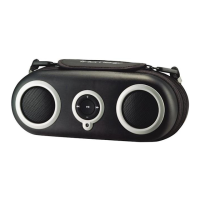
iH80 quick start
2
Table 1: Selecting an Insert
ALWAYS USE CORRECT INSERT TO DOCK YOUR iPod
THIS UNIT DOES NOT CHARGE OR CONTROL 3G iPod
2: inserts
To charge and play iPod, attach
AC adaptor plug to jack on
back of the iH80 and plug the
other end into a working AC
outlet. For portable play, open
battery door located on the
bottom of the iH80. Install 8 “C”
batteries (match + and -
polarity in diagram).
1: power
3: iPod
1: power: AC or
batteries
Select the dock insert for your
iPod® model from the table
below and place insert in
dock.
Never dock an iPod without a
correct insert in place.
Insert iPod into dock (iPod
must not be in a “skin” or case).
Press the iPower On/Off (play)
Button on the iH80 to play
your iPod.
iPod nano
Insert 8
iPod 1G and 2G nano
iPod with video (30 GB)
Insert 9
thin (30 GB) iPod with video
iPod with video (60,80 GB)
Insert 10
thick (60,80 GB) iPod with video


 To Next Page