EasyManua.ls Logo

Ihse L474-BSHC - User Manual

Default Icon
89 pages
Print Icon
To Next Page IconTo Next Page
Loading...
Document 474_494_REV02.01_en
Edition: 2023-04-03
USER MANUAL
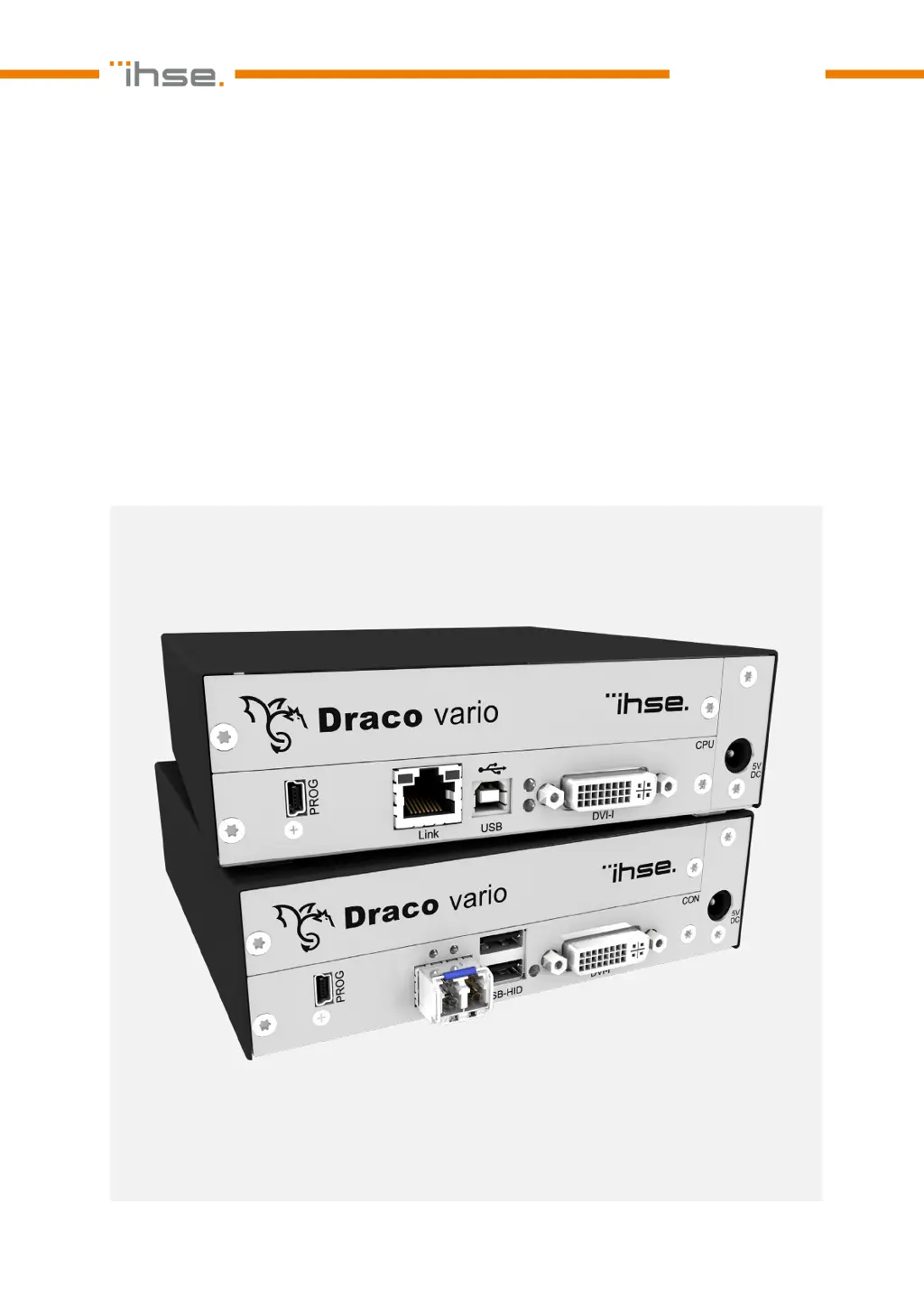
Draco vario DVI
Draco vario ultra DVI
KVM Extender
Series 474
/494

Table of Contents

Questions and Answers

  • S
    Stephanie GuzmanAug 10, 2025
    Why is the LED 5 violet on my Ihse L474-BSHC CON Unit?
    • M
      Maria BurchAug 10, 2025
      The LED 5 on your Ihse Extender CON Unit might be violet because no video signal is detected. Try these steps: * Check the video cable to the source. * Check the connectors. * Reboot the source if necessary.
  • S
    Stacy CrossAug 15, 2025
    What to do if LEDs 1/3 or 2/4 are flashing on my Ihse L474-BSHC?
    • G
      Gabriel SullivanAug 15, 2025
      If LEDs 1/3 or 2/4 are flashing on your Ihse Extender, it indicates that there is no link connection between the CON Unit and the CPU Unit. You should: * Check the interconnect cables. * Check the connectors.
  • J
    Jay CarterAug 22, 2025
    What does it mean when LED 5 is flashing red/violet/blue on my Ihse Extender CON Unit?
    • R
      rachel76Aug 22, 2025
      A flashing red/violet/blue LED 5 on your Ihse Extender CON Unit indicates that there is no link connection between the CON Unit and CPU Unit. Check the interconnect cables and connectors.
  • J
    Jenna SanchezAug 27, 2025
    How to fix a Config.txt parameter without function on Ihse L474-BSHC Extender?
    • D
      Debra SantiagoAug 27, 2025
      If a parameter in your Config.txt file isn't working on your Ihse Extender, here are some things to try: 1. Write the parameter into the Config.txt file and save changes. 2. Write the start command #CFG into the first line of the Config.txt file. 3. Check for correct spelling and capitalization. 4. Restart the extender module.
  • K
    kimberly44Sep 2, 2025
    Why are all the LEDs off on my Ihse Extender?
    • K
      Kelsey OwensSep 2, 2025
      If all the LEDs are off on your Ihse Extender, it means that the power supply voltage is not available. Check the power supply units and the connection to the power network.

Summary

Important Information

1.4 Intended Use

Describes the purpose of extender modules and their usage with Cat X or fiber cables.

Safety instructions

Description

4.1 System Overview

General overview of KVM extender modules and point-to-point connection.

4.2 System Compatibility

Overview of compatibility between different extender module series.

4.2.2 Interconnection Compatibility

Details compatibility for Cat X and fiber interconnections between modules.

4.3 Product Types

Lists different DVI-D and DVI-I extender modules.

4.7 Status Indication of the Extender Modules

Explains the meaning of status LEDs on modules and interfaces.

4.7.3 Video and USB HID - Point-to-Point Connection - DVI-D Extender Modules

Explains LED behavior for point-to-point DVI-D connections.

4.7.4 Video and USB HID - Point-to-Point Connection - DVI-I Extender Modules

Explains LED behavior for point-to-point DVI-I connections.

4.7.5 Video and USB HID - Matrix Connection - DVI-D Extender Modules

Explains LED behavior for matrix DVI-D connections.

4.2.1 Video Compatibility

Table showing video compatibility between module types.

Access Options

Command mode

Enables access to functions via keyboard commands.

Management software

Software for configuration, monitoring, and updates.

Installation

6.1 Setting up the System

Basic steps for system setup, including connecting units and power.

Configuration

Operation

Summary of Keyboard Commands

Maintenance

11.3.3 Updating Firmware via Management Software

Detailed steps for firmware update via software.

11.5 Resetting an Extender Module to the Factory Settings

Procedures to reset module parameters, USB HID, and EDID.

11.3 Updating the Firmware via Management Software

Requirements for updating firmware using management software.

Troubleshooting

12.1 General Failures

Common issues like Config.txt problems and module restart failures.

12.2.2 Blank Screen at DVI-I Extender Modules L-;R474-BVHx and L494-BVHx

Troubleshooting for blank screens on DVI-I modules.

12.3 Blank Screen with Matrix Connection

Troubleshooting blank screens in matrix setups.

12.4 USB HID Failure with Point-to-Point Connection

Troubleshooting USB HID issues in point-to-point setups.

12.5 USB HID Failure with Matrix Connection

Troubleshooting USB HID issues in matrix setups.

12.2 Blank Screen with Point-to-Point Connection

Troubleshooting steps for blank screens in point-to-point setups.

Technical Data

Technical Support

Ihse L474-BSHC Specifications

General IconGeneral
BrandIhse
ModelL474-BSHC
CategoryExtender
LanguageEnglish

Related product manuals