English
17
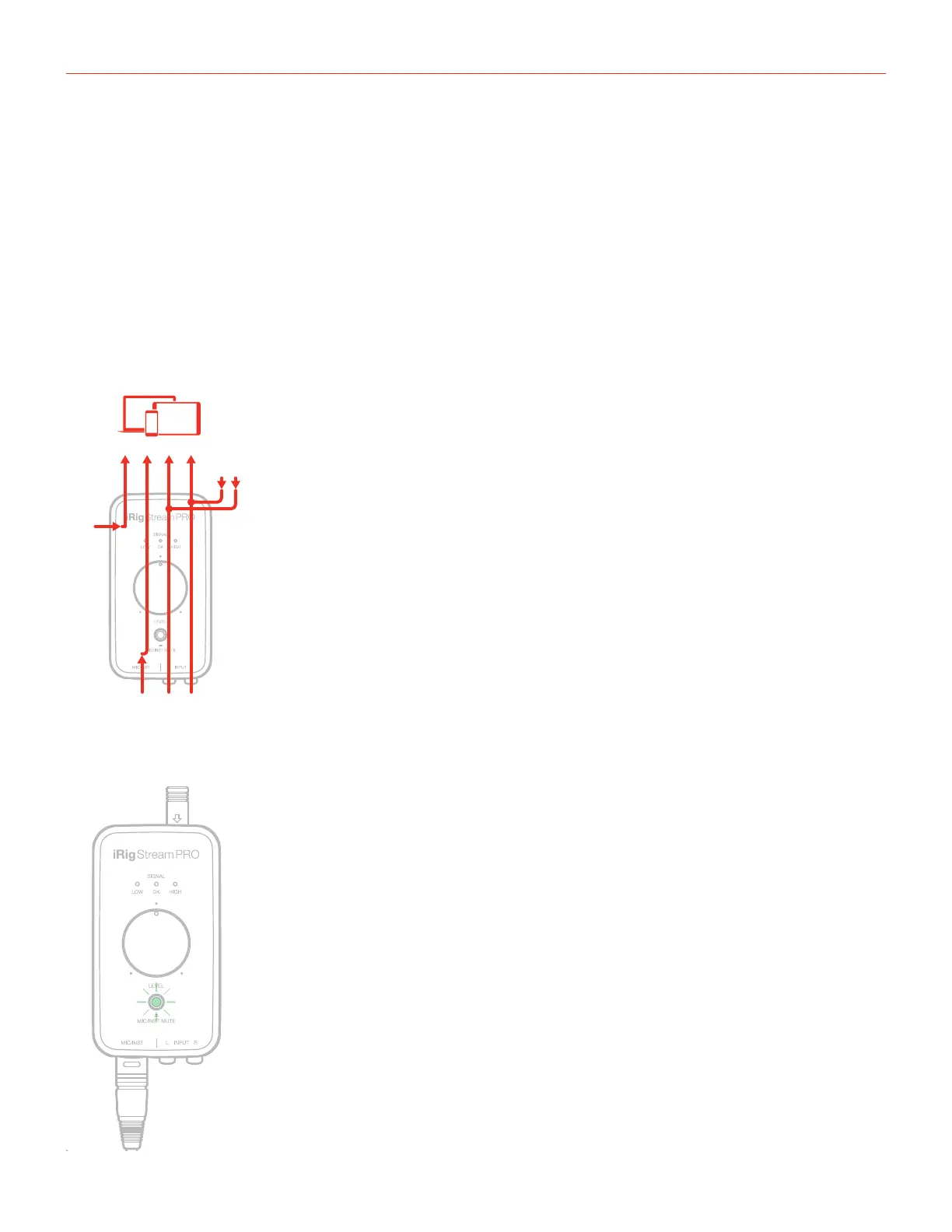
It is possible to change the configuration of the interface to multichannel mode, which will change the channel
count as follows:
Channel 1: RCA L + LOOPBACK L
Channel 2: RCA R + LOOPBACK R
Channel 3: MIC/INST IN
Channel 4: HEADSET IN
Ch2
LOOPBACK
Ch1
R L
RCAMIC/INST
RLIN
Ch4 Ch3 Ch1 Ch2
LOOPBACK
R L
RCAMIC/INST
RLIN
2 CHANNEL MODE MULTI CHANNEL MODE
HEADSET
IN
HEADSET
IN
MULTICHANNEL
MODE
When the interface is set to multichannel mode, the “Mic/Inst Mute” button is lit green at low intensity.
Light
GREEN
Multichannel
mode






 To Next Page