Preparing to Install Zoom Clamp & Gear Sleeve
Determine the type
of lens being used
on the camera.
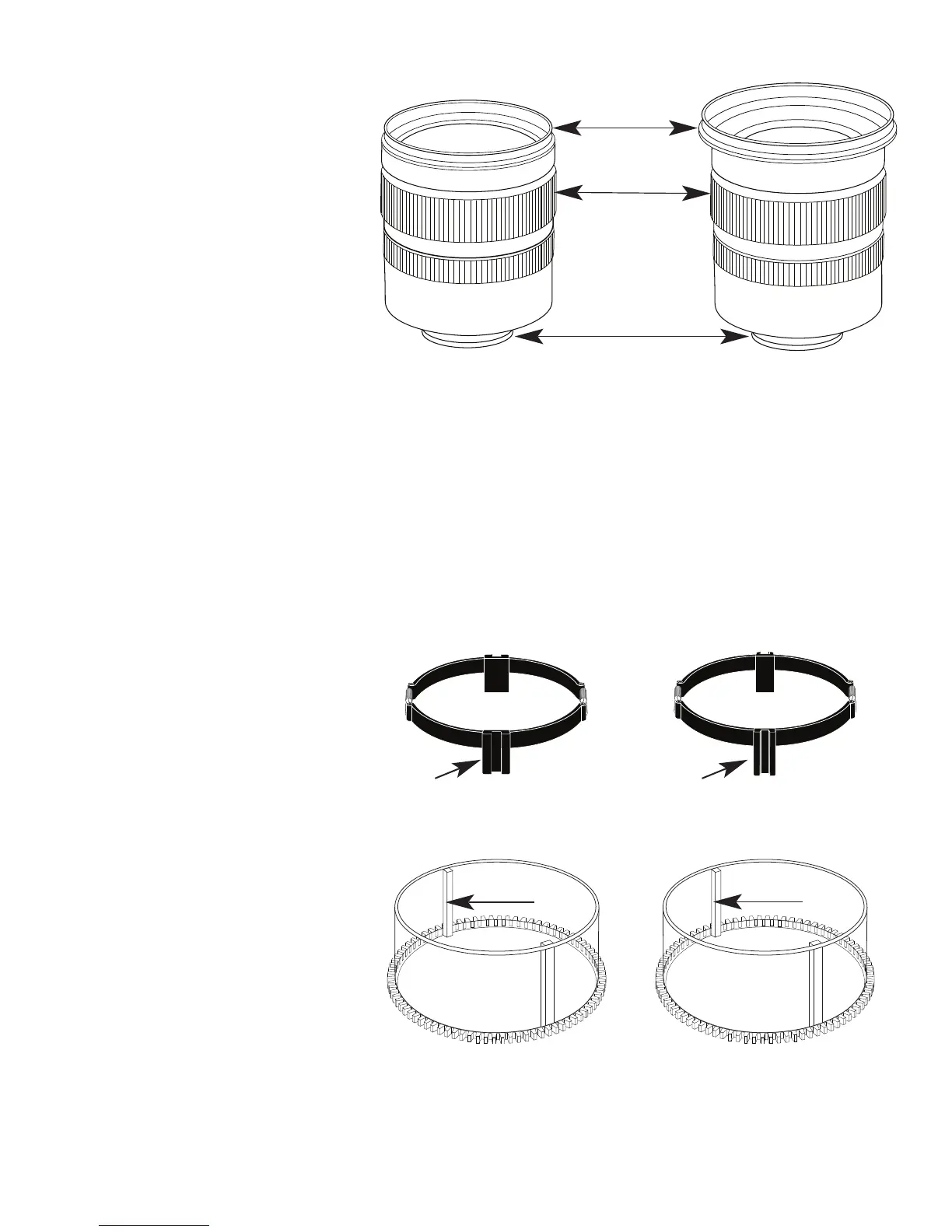
Type 1 Lenses have
a lens opening that
is NOT larger in
diameter than the
zoom ring. (Fig. 1).
Type 2 Lenses have a lens
opening that IS larger in diameter than the zoom ring. (Fig. 2).
Zoom Clamps & Gear Sleeves Included with Housing
There are 2 different
Zoom Clamps and
Gear Sleeves
provided with the
housing. Start with
the suggested Zoom
Clamp and Gear
Sleeve depending
on the Type of
lens being used.
See (Fig. A or B)
lens
opening
zoom
ring
bayonet
mount
Type 1 lens Type 2 lens
(Figure 1) (Figure 2)
Normally used with
Type 1 lens (Fig.1)
#9059.8 small diameter clamp:
For use with #0073 sleeve
+
#0073 sleeve: Use with
small diameter zoom clamp
#9059.8
Figure A
Normally used with
Type 2 lens (Fig.2)
#5509.28 Package
#9059.9 large diameter clamp:
For use with #0073.1 sleeve
+
#0073.1 sleeve: Use with
large diameter zoom clamp
#9059.9
Figure B
thick ribs
thin ribs
wide
grooved
extension
tabs
narrow
grooved
extension
tabs
10


 To Next Page