Customer Support: 1-888-999-4215 iLive 7
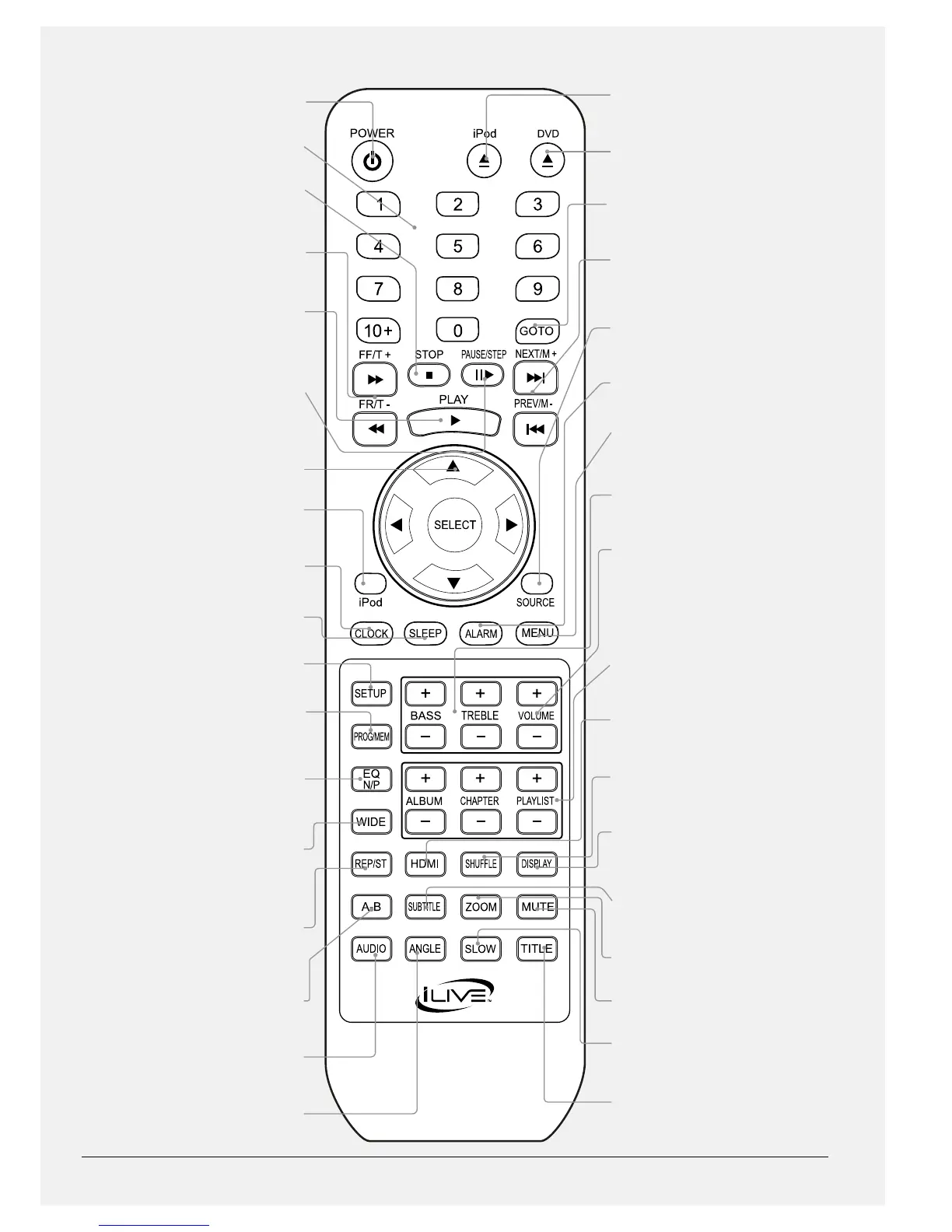
POWER
Press to turn the bar speaker’s power o
or on.
NUMBER KEYPAD
STOP
Press to stop a loaded or docked CD, DVD,
iPhone, or iPod during play.
FAST-FORWARD/FAST-REWIND/TUNE +/-
In DVD mode, press to fast-forward or fast-
rewind a loaded DVD or CD. In FM radio
mode, press to tune the FM radio.
PLAY
Press to play a loaded or docked CD, DVD,
iPhone, or iPod.
PAUSE/STEP
Press to pause a loaded or docked CD,
DVD, iPhone, or iPod. In DVD mode, press
continuously to step through a playing
DVD one frame at a time.
DIRECTIONAL/SELECT
Press to navigate DVD, iPhone, and iPod
menus. Press to make selections on a
loaded DVD, CD, iPhone, or iPod.
iPod
Press to switch to iPod mode.
CLOCK
With the power o, press to set the clock.
SLEEP
Press repeatedly to set the sleep timer.
SETUP
Press to access the DVD setup menu.
PROGRAM/MEM
Press to program a loaded CD or DVD to
play tracks or chapters in a specied order.
In radio mode, press to save the current
station as a preset.
EQ and N/P
Press to adjust the EQ setting. In DVD
mode, with the DVD stopped, press and
hold to switch between NTSC ,PAL, and
AUTO.
WIDE
In DVD mode, press to switch between
Normal/PS, Normal/LB, and Wide screen
format.
REP/ST
Press to repeat a chapter or track, title, or
entire album. In radio mode, press to turn
FM stereo o and on.
A-B REPEAT
Press to create a repeating loop on a
specied section of a loaded DVD.
AUDIO
Press to adjust the audio options on the
loaded DVD.
ANGLE
On supported DVDs, press to view
alternate angles.
iPod OPEN/CLOSE
Press to open or close the iPhone/iPod
compartment.
DVD OPEN/CLOSE
Press to open or close the DVD
compartment.
GOTO
Press to go to a specied chapter, title, or
time on a loaded DVD.
NEXT/PREVIOUS/MEMORY +/-
Press to skip between chapters or tracks. In
radio mode, press to cycle through saved
radio stations.
SOURCE
Press to switch between iPod, FM radio,
DVD, AUX, LINE, AV1, and AV2 modes.
ALARM
Press to set the alarm.
MENU
In DVD or iPod mode, press to return to the
loaded DVD’s main menu or docked iPod’s
previous menu.
BASS/TREBLE
Press to adjust the bass and treble levels
when in EQ at mode.
VOLUME
Press to adjust the volume.
ALBUM/CHAPTER/PLAYLIST
Press to cycle through albums, chapters, or
playlists on a docked iPhone or iPod.
HDMI
In DVD mode, press repeatedly to adjust
the resolution output from the bar speaker.
SHUFFLE
Press to play tracks from a DVD, CD, iPhone,
or iPod in a random order.
DISPLAY
In DVD mode, press to view the on-screen
display. In radio mode, press to view the
time.
SUBTITLE
Press to adjust the subtitle options on the
loaded DVD.
ZOOM
Press to adjust the zoom on a playing DVD.
MUTE
Press to mute the volume.
SLOW
Press to watch the loaded DVD in slow
motion.
TITLE
Press to return to the loaded DVDs title
menu.



 To Next Page