EasyManua.ls Logo

iLive ITDP310B - Introduction

iLive ITDP310B
20 pages
Print Icon
To Next Page IconTo Next Page
To Previous Page IconTo Previous Page
Loading...
iLive6
Introduction
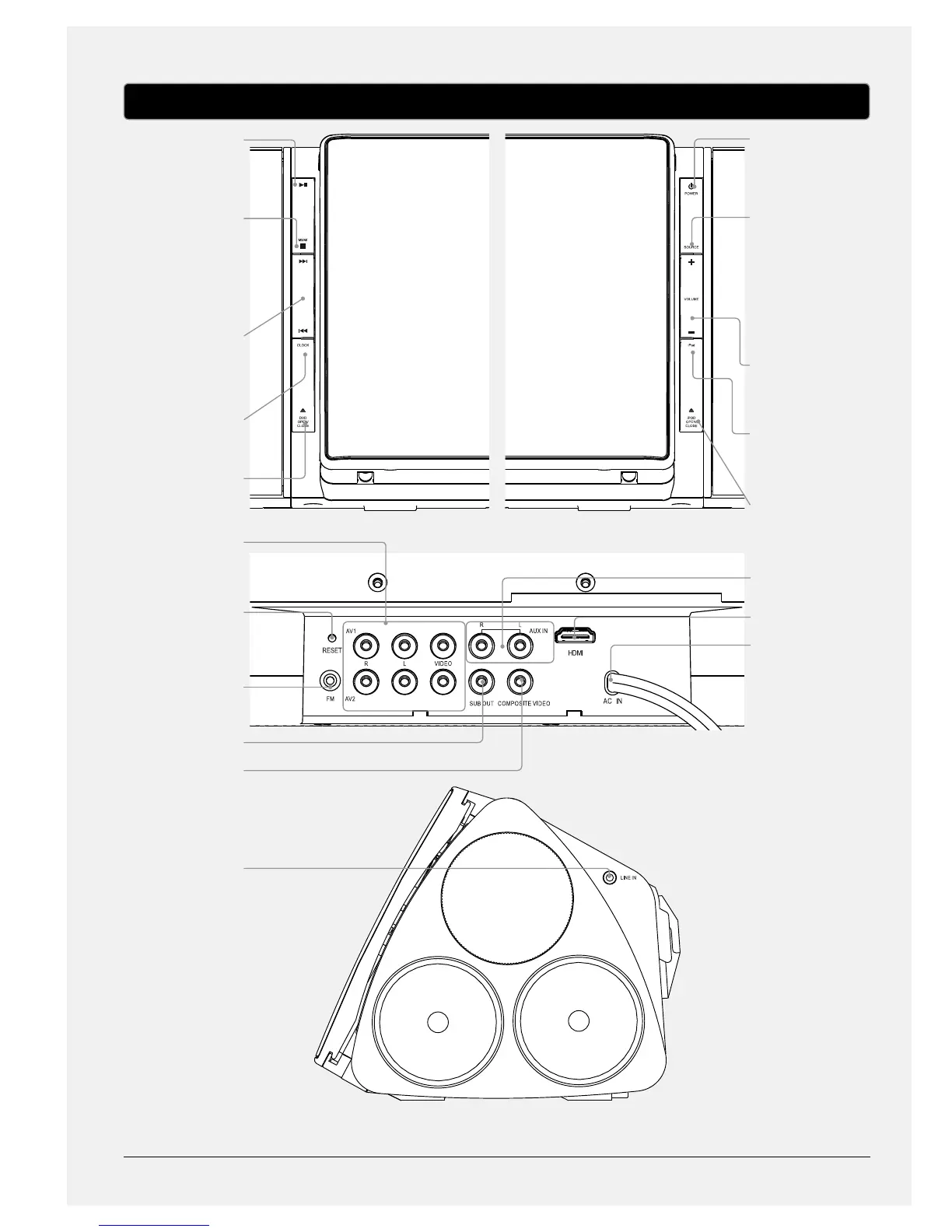
PLAY/PAUSE
Press to play or pause
a loaded or docked CD,
DVD, iPhone, or iPod.
MEM/STOP
Press to stop a loaded
or docked CD, DVD,
iPhone, or iPod during
play. In radio mode,
press to save the
current station as a
preset.
SKIP
Press to skip between
tracks or chapters on a
loaded or docked CD,
DVD, iPhone, or iPod.
CLOCK
With the power o,
press to set the clock.
DVD OPEN/CLOSE
Press to open or close
the DVD compartment.
AV1 and AV2
Use to input RCA audio
and Composite video
into the bar speaker.
RESET
Press using a paperclip
or like object to reset
the bar speaker to it’s
original settings.
FM WIRE ANTENNA
Adjust to improve the
FM radio reception.
SUBWOOFER OUTPUT
VIDEO OUTPUT
3.5mm AUDIO INPUT
POWER
Press to turn the bar
speaker’s power o
or on.
SOURCE
Press to switch
between iPod, FM
radio, DVD, AUX, LINE,
AV1, and AV2 modes.
VOLUME
Press to adjust the
volume output from
the bar speaker.
iPod
Press to switch to iPod
mode.
iPod OPEN/CLOSE
Press to open or close
the iPhone/iPod
compartment.
RCA AUDIO INPUT
HDMI OUTPUT
AC POWER CABLE

Related product manuals