8
Connecting Your Speakers
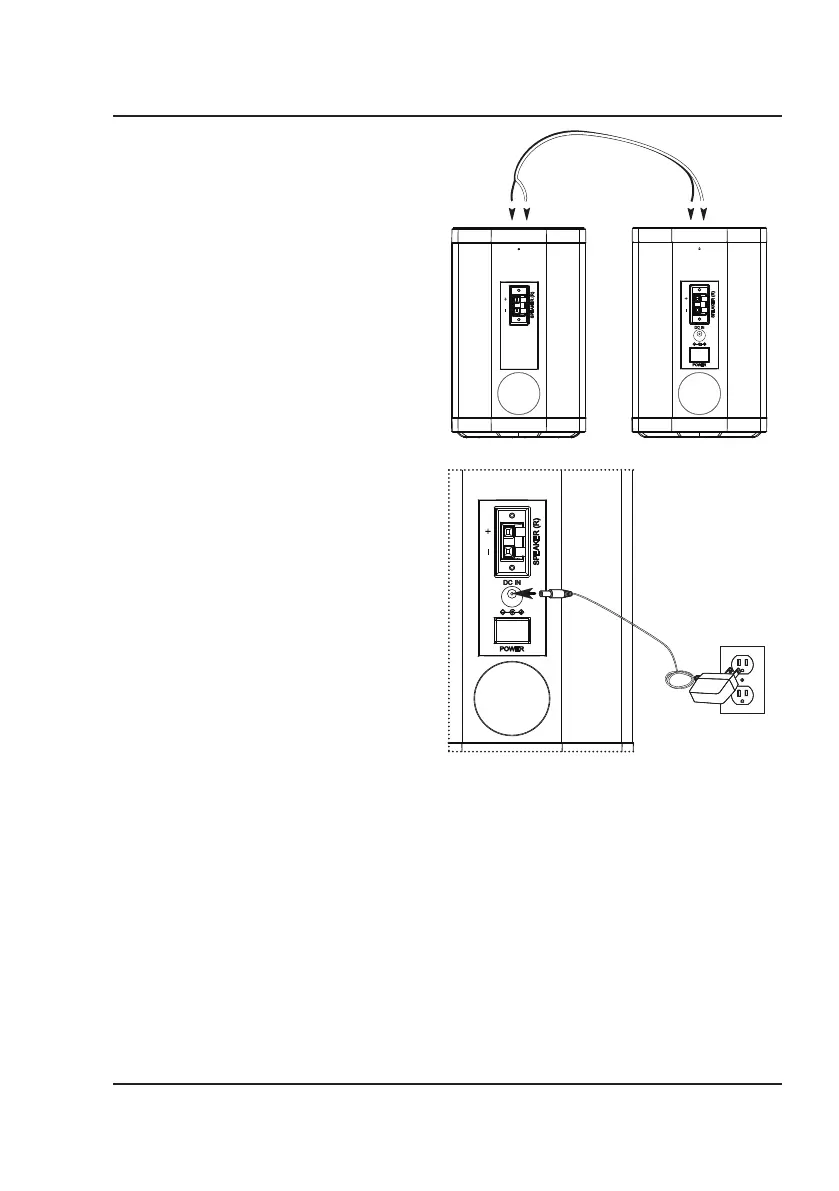
Connect Your Speaker to Power
1. Plug the power adapter into the DC power
input on the speaker and a standard outlet.
2. Press the Power button to turn the speakers on.
Connect Your Speakers
Connect the speakers using the included speaker
cable.
1
. Plug the red end of the connection cable into
the red port on the back of the left speaker.
2. Plug the black end of the connection cable
into the black port on the back of the left
speaker.
3. Connect the red plug on the other end of the
cable to the red port on the back of the right
speaker. Then, connect the black plug to the
black port.
Connect with Bluetooth
When the speakers first power ON they default to Bluetooth Mode and are ready to pair automatically. When
pairing, remain within 3 feet of the Bluetooth device.
1. Using the controls on your Bluetooth device, select ISBW763BDL in the Bluetooth settings to pair. If you
have trouble with accessing Bluetooth settings, refer to the user’s manual for your specific device for
more information.
2. When successfully paired, audio from your Bluetooth device will play through the speakers.
3. Use the controls on the connected Bluetooth device to select and play audio.
4. The speaker will remember and try to connect to the last used device. Press and hold the PAIR button on
the remote to disconnect from the last device and connect to a new device.
Note: If you are having trouble with automatic pairing to your device, use the PAIR button on the remote to
enter pairing mode on the speaker. Then, follow the steps listed above.


 To Next Page