Illustra Flex 3MP Indoor and Outdoor Dome Cameras Quick Start Guide
8200-1456-02 E0 16
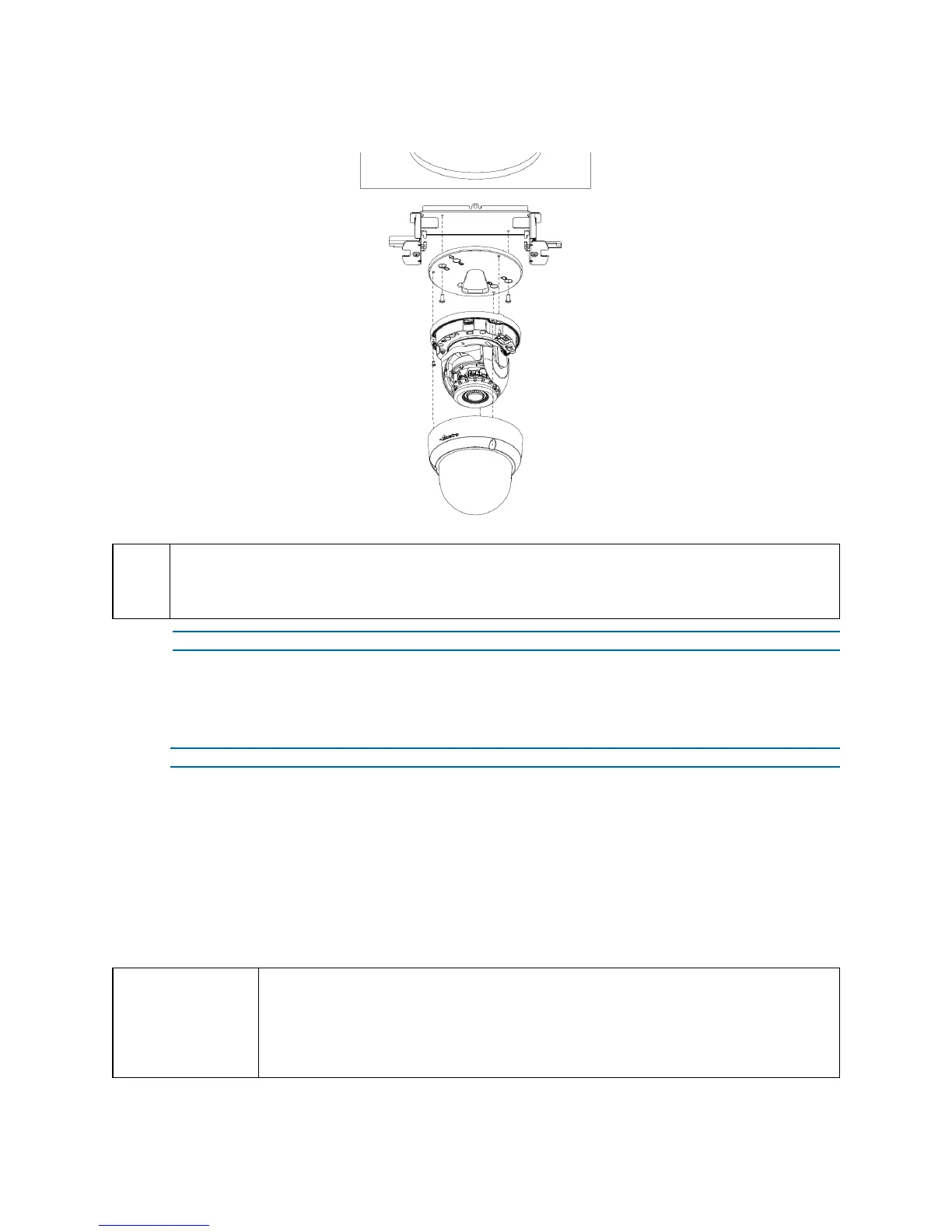
Figure 22 Mounting the camera with the junction box
NOTE
The mounting kit called out in Figure 22 on page 16 is not supplied with the unit.
Keeping tilt angle over 25 degrees is recommended when IR-LED light is used. If tilt angel is below 25
degrees from the horizontal, the image would be flashed by the reflection of IR-LED light.
- End -
Procedure 10 Adjusting the Position
The unit has three axes for positioning, refer to Figure 23 on page 17. While monitoring, adjust the
position as below.
Step Action
1 Pan Adjustment (A) For Wall Mount and Tilted Ceilings:
a Rotate the lens base (maximum 375°) until you are satisfied with the field of view.
2 Horizontal Rotation (B):
a Rotate 3D assembly in the base. Do not turn assembly more than 360° as this
assembly may cause the internal cables to twist and disconnect or break.
3 Tilt Adjustment (C):
a Tilt the lens base (maximum 90°) until you are satisfied with the field of view.
CAUTION
Limitation for three axes position:
• Pan range: 375°
• Tilt range: 75°
• Rotate range: Motorize Lens 356°


 To Next Page