EasyManua.ls Logo

ILVE OV60 - Selecting Cooking Functions and Temperature; Setting Cooking Time and Programmed Start

ILVE OV60
48 pages
Print Icon
To Next Page IconTo Next Page
To Previous Page IconTo Previous Page
Loading...
11 :48 AM
320
°C
INSTRUCTIONS FOR USE
TFT touch display - Settings
11 :48 AM
__:__
__:__
120
°c
50 100150 200250 300
0
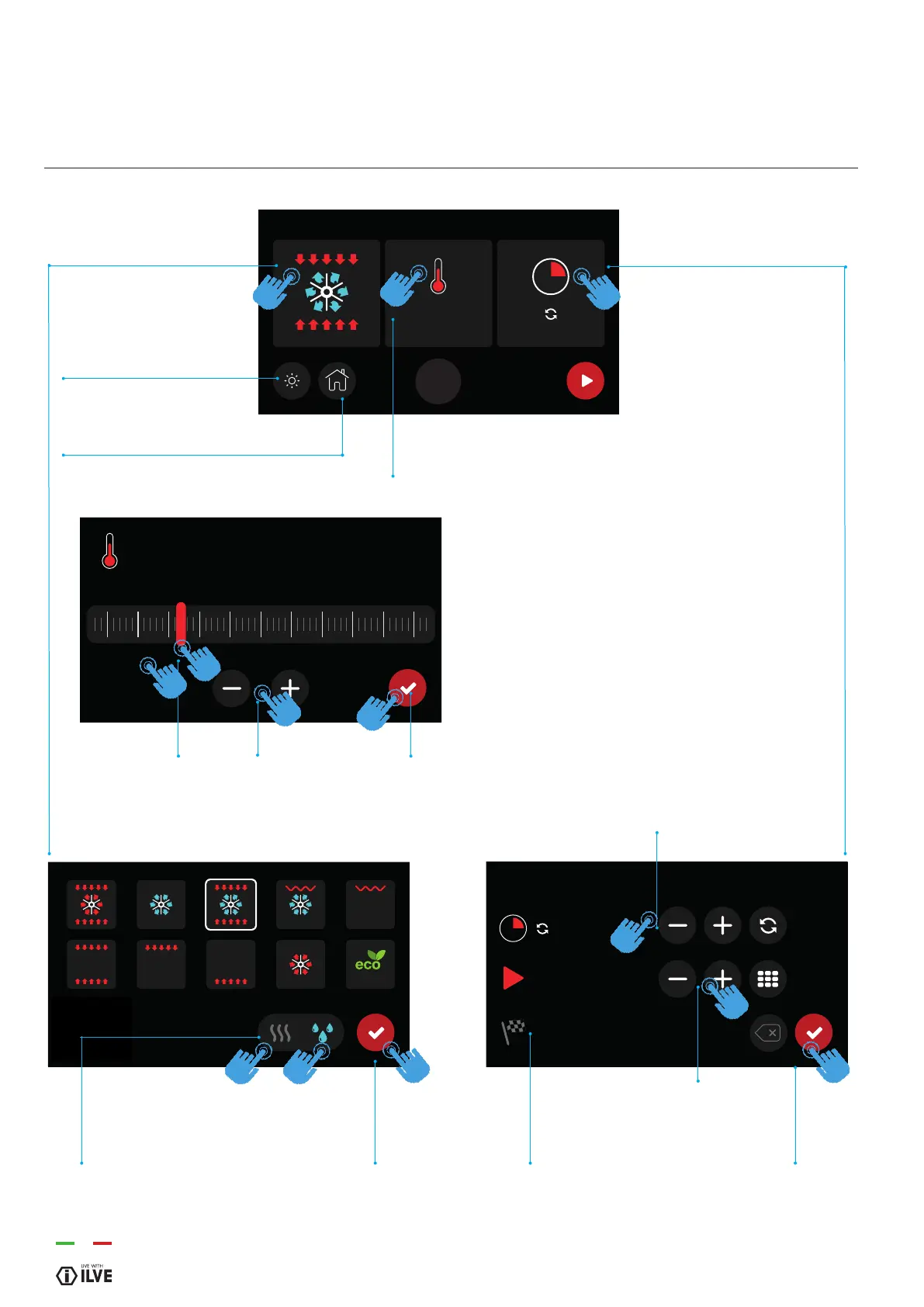
1- Choose cooking
function
Light (turned on or off)
Home (back to the home screen)
2- Set the cooking temperature
3- Set the cooking time and
programmed start
1b - Conrm cooking
function
3d - Conrm the cooking
function
3a - Set the
cooking time
3c - Set the start
time
3b - Shows the
cooking time
2a - There are two options for
setting the temperature:
scrolling the bar
with + or
-
2b - Conrm the cooking function
1a - Choose dry /
wet cooking
NOTE: only possible in
certain cooking methods
22

Related product manuals