If you experience noise in the captured images you should try to increase
the post delay time using the Set... option.
Use the Ready -> Mode Timeout... function to set the time after which
the camera back CCD switches into a "sleep" mode thus generating less
heat.
Note! The first capture performed hereafter will act as a "wake-up"
capture and be accompanied by an error message saying "Bad Exposure".
This capture should be deleted instantly.
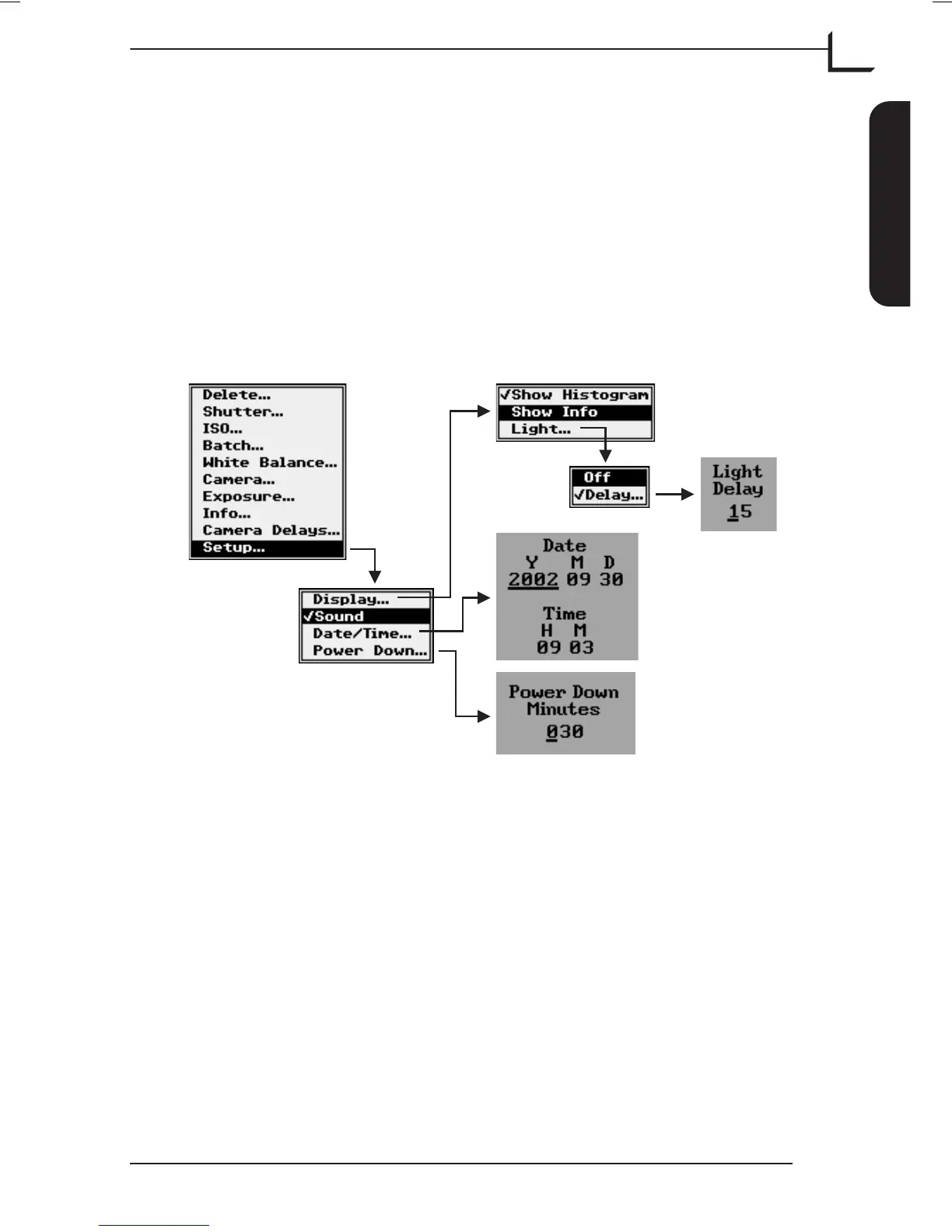
Setup…
This function holds the general settings for the camera back.
Use the Display -> Show Histogram and Show Info settings to display
the histogram and info bar respectively for the current image on top of
the preview image - see "Displaying Images" on page 16.
Use the Display -> Light... setting to turn the display background light
on or off.
When using the Delay... function the light is set to automatically turn off
after a certain time of inactivity.
The camera back is able to play 3 different sounds to indicate “Camera
Ready”, “Image Overexposed” and “Image Underexposed” respectively.
Use the Sound setting to enable or disable the sounds.
See “Taking Pictures” on page 43 for details.
Use the Date/Time... entry to set the current date and time. The date and
time is added to the image file information (see page 19).
User's Guide - Imacon Ixpress
English
The Ixpress Camera Back
27
Using the Control Panel



 To Next Page