Blacktip II - User Manual
IMENCO AS Visiting Address: Kophaug 3, 5570 Aksdal, Norway Office: +47 52 86 41 00 imenco@imenco.com
Org No: 923 005 749 MVA Postal Address: PO. Box 2143, 5504 Haugesund, Norway Fax: +47 52 86 41 01 www.imenco.com
7
3.2 Function test
A preliminary function test should be performed prior to full scale installation. This is to
familiarize the user with the control functions and to verify that the system is fully
operational after shipment.
Follow these steps to power up and check the proper functioning of the camera:
1) Clear necessary space on your working desk and gather the
a. The Blacktip II camera
b. Power supply providing DC between 12V and 36V, minimum 20W
c. Test cable
d. Monitor with SD video input
2) Do not power up the camera yet.
Lubricate the subsea connector and mate it properly.
3) Now turn on the DC power to the Camera.
4) Changes to settings and camera control is done by means of the Imenco
serialCommander software or by the Visca software if the camera is configured for
RS232 / RS485.
3.3 Mechanical Installation
Installation of this product should only be performed by qualified personnel.
Do not open the camera when carrying out the installation.
Mount the camera on a secure and vibration free surface and strap the cable for stress
relief to the supporting structure.
The camera should be electrically isolated from the mounting base in order to minimize
any corrosion current between the relatively noble Titanium housing of the camera and
surrounding metal structures.
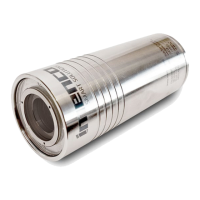
The main logo printed on the camera indicates the top of image.


 To Next Page