11 12
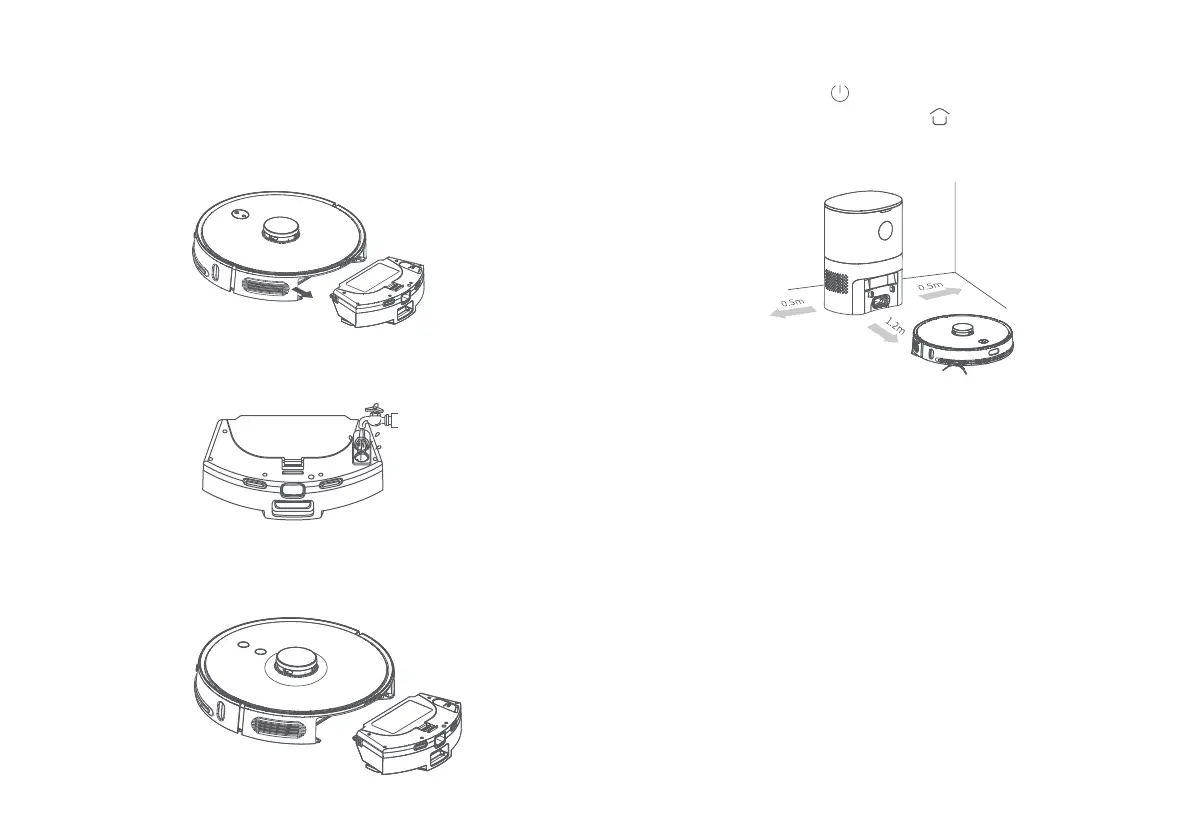
3. Wet the mop cloth and attach it to the Velcro. Fill water using
the water inlet and insert the rubber cover securely.
2. Press the dust box release button to remove the 2-in-1 dust
box and water tank. When using the 2-in-1 water tank for the
first time. The water tank may contain a very small amount of
water, left behind after a production test. This is normal.
4. Insert the 2-in-1 dust box and water tank into the robot
vacuum.
Note:
1. When the robot vacuum returns to the dust collection dock
after at least 1 minute of cleaning. The dock will automatically
clear the dust box. While the dust is being collected, a green
arrow will flash brightly on the display.
2. The robot vacuum may not start when its battery is too low.
Please fully charge the robot vacuum before using it.
3. When the battery is running low during a cleaning operation,
the robot vacuum will automatically return to the dust collection
dock to recharge. After it is charged, the robot vacuum will
return to the original spot to continue cleaning.
5. Press and hold the “ ” button for 3 seconds to power on
the robot vacuum. Short press the “ ” button to return the
robot vacuum to the stand. The robot vacuum will enter
standby mode after it is fully charged.



 To Next Page